Introduction to Local Functions
Max Anjos
September 18, 2026
Source:vignettes/Introd_local_LCZ4r.Rmd
Introd_local_LCZ4r.RmdThe Local functions of LCZ4r are specialized tools designed to analyze large datasets, such as hourly air temperature readings. This tutorial focuses on using data from Berlin, collected across 23 meteorological stations as part of the Urban Climate Observatory (UCO).
Overview
The Local functions in LCZ4r, offer
powerful tools to handle and analyze urban climate data. They enable
time-series analysis, mapping of thermal anomalies, spatial
interpolation, and more. Below is a summary of these functions:
| Function | Description | Data Required | Internet Access Required |
|---|---|---|---|
lcz_ts() |
Analyze LCZ Time Series | Yes | Not needed |
lcz_anomaly() |
Calculate LCZ Thermal Anomalies | Yes | Not needed |
lcz_anomaly_map() |
Map LCZ Thermal Anomalies | Yes | Not needed |
lcz_interp_map() |
Perform LCZ Interpolation | Yes | Not needed |
lcz_plot_interp() |
Visualize LCZ Interpolation | Yes | Not needed |
lcz_interp_eval() |
Evaluate LCZ Interpolation | Yes | Not needed |
lcz_uhi_intensity() |
Assess LCZ for Urban Heat Island Intensity | Yes | Not needed |
💡 Tips:
Utilize the
help(lcz_*)function to access detailed documentation for each LCZ4r function. For example, to learn about thelcz_tsfunction, typehelp("lcz_ts")in the console.Each LCZ4r function supports imputation for handling missing values within data frames. For more information on imputation methods, refer to the “impute” argument in the documentation of each function.
Data input requirements
To ensure smooth operation of the local functions, input data should be structured as a data frame with the following columns:
date: This column should contain date-time information. This column must be labeled as “date”, “time”, “timestamp” or “datetime”. Ensure that the date-time format aligns with R’s conventions (e.g., YYYY-MM-DD HH:MM:SS). Acceptable formats include “1999-02-01”. For more details, see format dates and times in the openair packR.
Station Identifier: A column for identifying meteorological stations.
Air Temperature or other variable: At least one column representing the air temperature or any other target variable.
Latitude and Longitude: Two columns for the geographical coordinates of each station. Ensure the column is named “lat” or “latitude” and “lon”, “long” or “longitude”.
To simplify this setup, LCZ4r provides a sample data frame, which you can load with the following command:
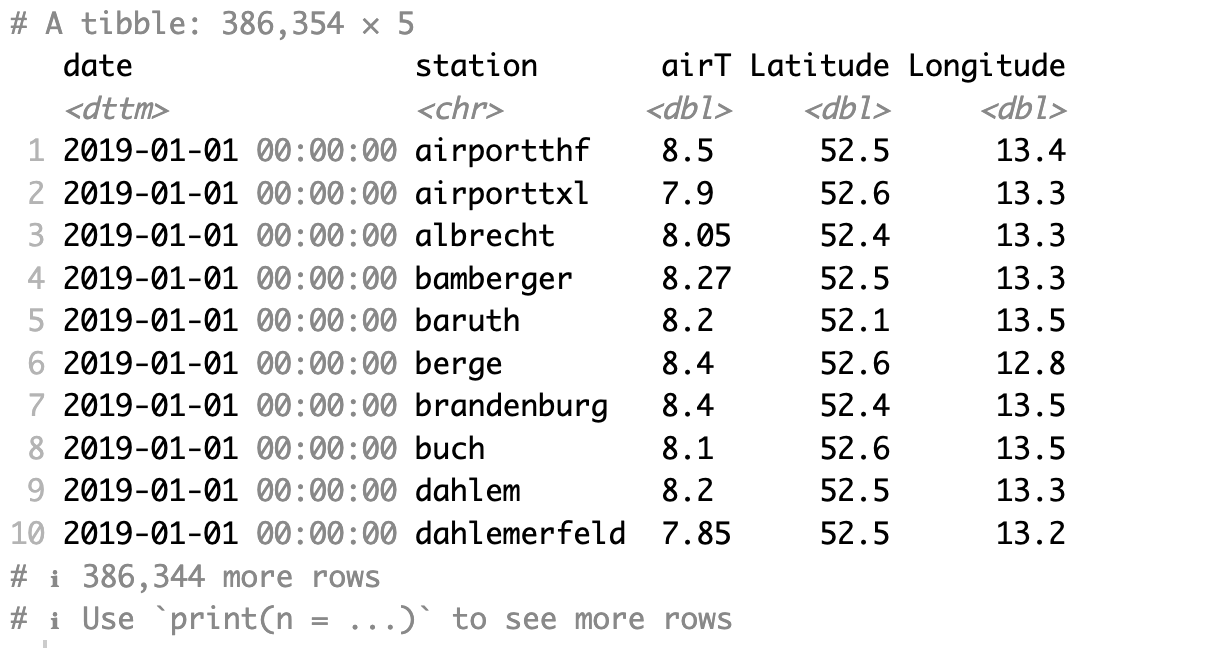
Structure of the LCZ sample dataset showing date, station, temperature, and coordinates columns
Import your data
if(!require(data.table)) install.packages("data.table")

# Replace the path with the actual path to your CSV file
my_data <- data.table::fread("PC/path/file_name.csv")

head(my_data)
Customizing Local Functions in LCZ4r
You can further customize the Local Functions to suit specific analysis needs:
1. Flexibility time selection
The Local Functions have an argument ... that provides
options to filter data by specific years, months, days, and hours to
narrow down your analysis period. Examples of how to use these arguments
include:
Year(s): Numeric value(s) specifying the year(s) to select. For example,
year = 1998:2004selects all years between 1998 and 2004 (inclusive), whileyear = c(1998, 2004)selects only the years 1998 and 2004.Month(s): Numeric or character value(s) specifying the months to select. Numeric examples:
month = 1:6(January to June), or character examples:month = c("January", "December").Day(s): Numeric value(s) specifying the days to select. For instance,
day = 1:30selects days from 1 to 30, orday = 15selects only the 15th day of the month.Hour(s): Numeric value(s) specifying the hours to select. For example,
hour = 0:23selects all hours in a day, whilehour = 9selects only the 9th hour.Start date: A string specifying the start date in either
start = "DD/MM/YYYY"(e.g., “1/2/1999”) or “YYYY-mm-dd” format (e.g., “1999-02-01”).End date: A string specifying the end date in either
end = "DD/MM/YYYY"(e.g., “1/2/1999”) or “YYYY-mm-dd” format (e.g., “1999-02-01”).
Examples
# Select a range of years (e.g., 1998:2004) or specific years (e.g., c(1998, 2004))
lcz_ts(
  lcz_map,
  year = 1998:2004
)

# Filter by month, either by numeric values (e.g., 1:6 for January to June) or by names
lcz_anomaly(
  lcz_map,
  year = 2012, month = 9
)

# Pinpoint a specific date, such as September 1, 2019
lcz_interp_map(
  lcz_map,
  year = 2012, month = 9, day = 1
)

# For a specific hour
lcz_anomaly_map(
  lcz_map,
  year = 2012, month = 9, day = 1, hour = 5
)

# Pinpoint a specific period using start and end dates
lcz_uhi_intensity(
  lcz_map,
  var = "airT",
  station_id = "station",
  start = "1/9/2019", end = "30/10/2019"
)
For more information, see the utility functions from the openair package.
2. Splitting LCZ time series by temporal window or site
You can segment the LCZ time series data using the by
argument, allowing for analysis across different temporal windows or
sites. Available split options include:
Temporal segments: “year”, “season”, “seasonyear”, “month”, “monthyear”, “weekday”, “weekend”.
Daylight split: “daylight”, which divides data into daytime and nighttime periods. Note that the Daylight option may result in both daytime and nighttime hours being represented in UTC. See NOAA and argument
typein openair package.Combinations: You can also use combinations like
c("daylight", "month")orc("daylight", "season").
# Split by month
lcz_ts(lcz_map, by = "month")

# Split by season
lcz_ts(lcz_map, by = "season")

# Split by daylight hours
lcz_anomaly(lcz_map, by = "daylight")

# Combine multiple splits
lcz_anomaly(lcz_map, by = c("daylight", "season"))
For further details, refer to the type in openair package.
Example workflows
Here are some practical examples of how to use the local functions:
Time series analysis
# Basic time series for a specific year
lcz_ts(
  lcz_map,
  var = "airT",
  station_id = "station",
  year = 2020
)
LCZ time series analysis showing temperature variations across different LCZ classes
Thermal anomaly mapping
# Map thermal anomalies for summer months
lcz_anomaly_map(
  lcz_map,
  var = "airT",
  station_id = "station",
  month = 6:8,
  year = 2020
)
Thermal anomaly map showing temperature differences across urban zones
Spatial interpolation
# Interpolate temperature for a specific date
lcz_interp_map(
  lcz_map,
  var = "airT",
  station_id = "station",
  year = 2020, month = 7, day = 15, hour = 12
)
Spatial interpolation of air temperature across the study area
Have feedback or suggestions?
Do you have an idea for improvement or did you spot a mistake? We’d love to hear from you! Click the button below to create a new issue (GitHub) and share your feedback or suggestions directly with us.
Open GitHub issue