Analyzing Urban Heat Islands Using Crowdsourced Air Temperature Data and LCZ4r
Max Anjos
September 18, 2026
Source:vignettes/local_func_modeling_crows.Rmd
local_func_modeling_crows.RmdIntroduction
Urban Heat Islands (UHIs) are a critical environmental issue in cities, where urban areas experience higher temperatures than their rural surroundings. This case study demonstrates how to analyze UHIs using crowdsourced air temperature (Tair) data from Citizen Weather Stations (CWS) and the LCZ4r package in R. We focus on hourly Tair data from May 2023, collected by Netatmo CWS in Berlin, Germany, and available through the CrowdQCplus package in R.
# Install and load necessary packages
if (!require("pacman")) install.packages("pacman")
install.packages("sf", type = "binary")
pacman::p_load(remotes, dplyr, tmap, ggplot2, devtools, data.table)

library(dplyr)   # For data manipulation
library(sf)      # For vector data manipulation
library(tmap)    # For interactive map visualization
library(ggplot2) # For data visualization
library(data.table)

# Install CrowdQCplus for quality control of CWS data
if (!require("CrowdQCplus")) {
  remotes::install_github("dafenner/CrowdQCplus")
}
library(CrowdQCplus)
Why Crowdsourced Data?
Crowdsourced weather stations offer unprecedented spatial coverage of urban temperature data: - High density: Hundreds or thousands of stations across the city - Real-time data: Hourly or sub-hourly measurements - Cost-effective: Utilizes existing citizen infrastructure - Complementary: Fills gaps in official monitoring networks
However, careful quality control is essential to ensure data reliability.
Dataset Preparation
Load LCZ Map for Berlin
# Retrieve the LCZ map for Berlin using the LCZ Generator Platform
lcz_map <- LCZ4r::lcz_get_map_generator(ID = "8576bde60bfe774e335190f2e8fdd125dd9f4299")

# Visualize the LCZ map
LCZ4r::lcz_plot_map(lcz_map)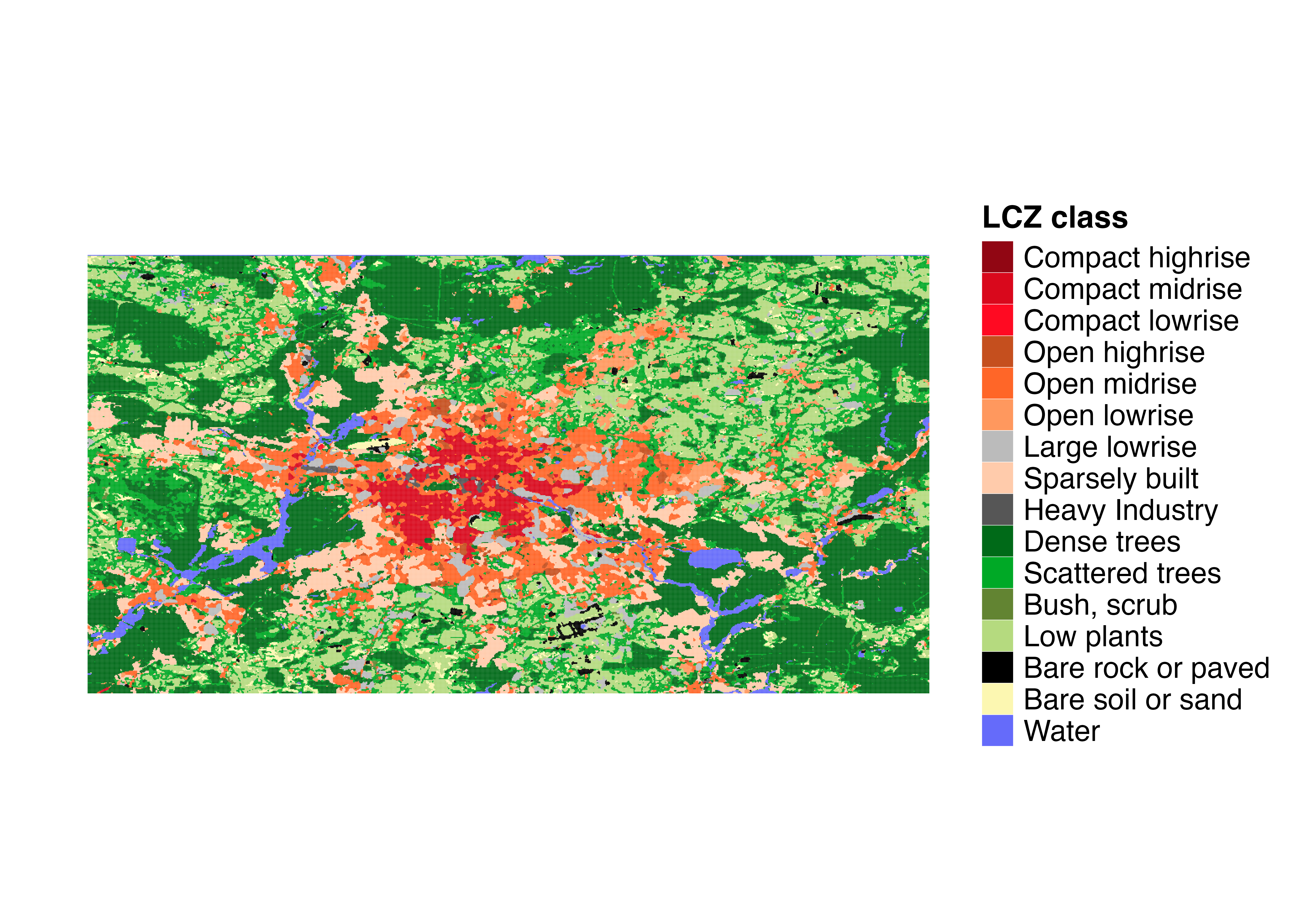
LCZ map of Berlin showing the spatial distribution of Local Climate Zones. This map serves as the spatial framework for analyzing crowdsourced temperature data.
Visualize CWS Station Distribution
# Convert CWS stations to an sf object for spatial analysis
shp_stations <- cqcp_cws_data %>%
  distinct(lon, lat, .keep_all = TRUE) %>%
  st_as_sf(coords = c("lon", "lat"), crs = 4326)

# Visualize CWS stations on an interactive map
tmap_mode("view")
qtm(shp_stations, dots.col = "blue", dots.size = 0.3,
    title = "Citizen Weather Stations in Berlin")
Quality Control of CWS Data
To ensure data reliability, we applied the quality control (QC) method developed by Fenner et al. (2021) using the CrowdQCplus package. This process filters out statistically implausible readings, improving data accuracy.
QC Process Steps:
- Data padding: Ensures consistent time series
- Input validation: Checks data structure
- Quality control: Applies statistical filters to identify outliers
- Output statistics: Summarizes QC results
# Perform data padding and input checks
data_crows <- cqcp_padding(cqcp_cws_data)
data_check <- cqcp_check_input(data_crows)

# Apply quality control
if (data_check) {
  data_qc <- cqcp_qcCWS(data_crows)  # QC process
}

# View QC output
head(data_qc)

# Display QC output statistics
n_data_qc <- cqcp_output_statistics(data_qc)
print(n_data_qc)
Understanding QC Output:
After applying QC, multiple columns are generated: - ta_int: Temperature values that passed all quality control steps - qc_flag: Quality control flags indicating data quality status - qa_flag: Quality assurance flags for additional validation
For air temperature interpolation, we use the ta_int
column, which represents the most reliable temperature estimates.
Diurnal Cycle Analysis by LCZ
We examined the diurnal cycle of air temperature for a specific day (May 1, 2023) across different LCZs to understand how urban form affects daily temperature patterns.
# Analyze diurnal temperature cycle across LCZ classes
cws_ts <- lcz_ts(lcz_map,
                 data_frame = data_qc,
                 var = "ta_int",
                 station_id = "p_id",
                 time.freq = "hour",
                 extract.method = "two.step",
                 year = 2023, month = 5, day = 1,
                 by = "daylight")

# Display the time series plot
cws_ts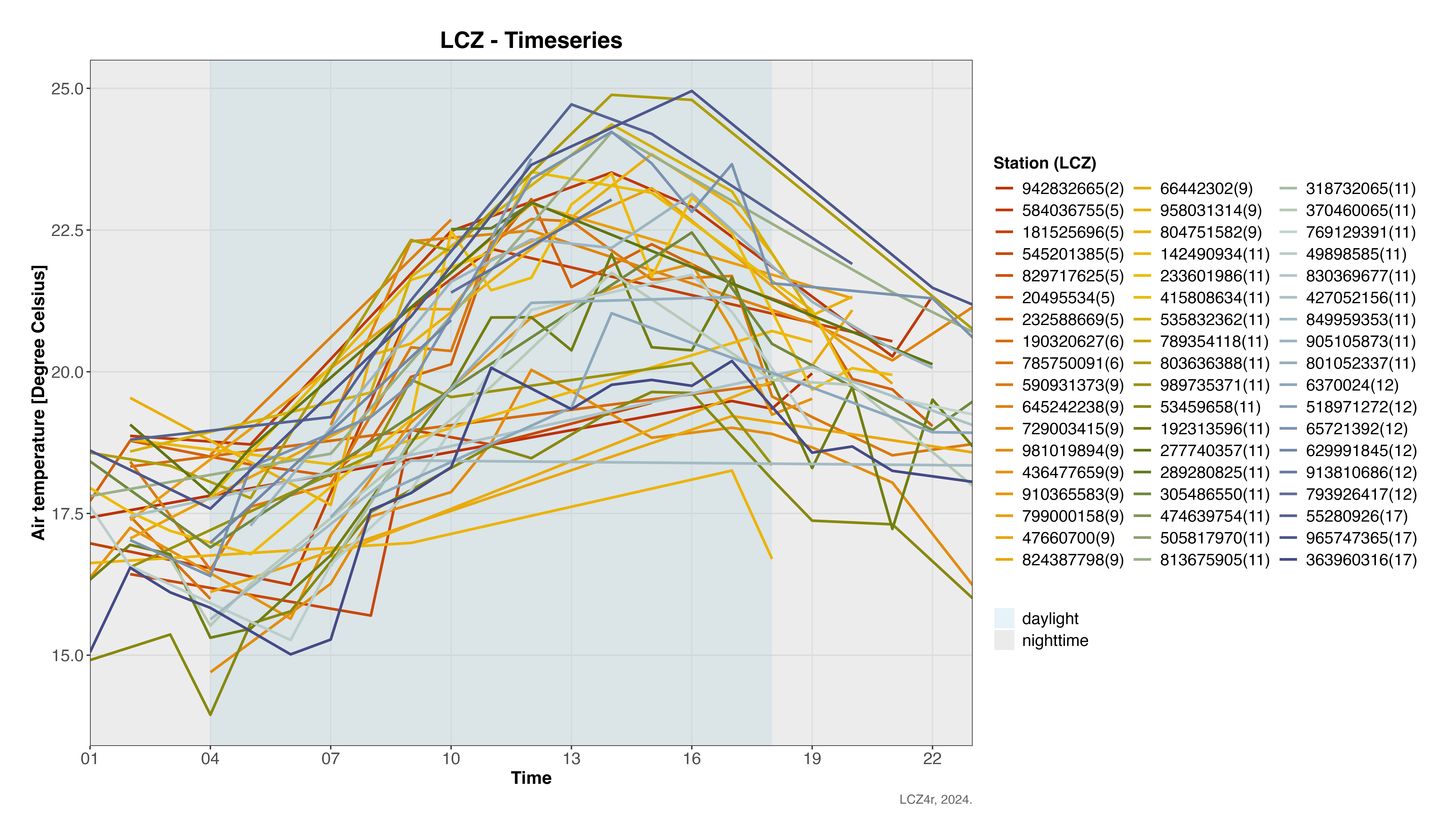
Diurnal temperature cycle across different LCZ classes in Berlin on May 1, 2023. Note how compact built areas maintain higher temperatures throughout the day compared to vegetated and open areas.
Urban Heat Island Analysis
UHI Intensity Time Series
We calculated hourly UHI intensities for May 2023 using the LCZ method, which automatically selects urban and rural temperatures based on LCZ classes.
# Calculate UHI intensity for May 2023
cws_uhi <- lcz_uhi_intensity(lcz_map,
                             data_frame = data_qc,
                             var = "ta_int",
                             station_id = "p_id",
                             time.freq = "hour",
                             extract.method = "two.step",
                             year = 2023, month = 5,
                             method = "LCZ")

# Display UHI intensity time series
cws_uhi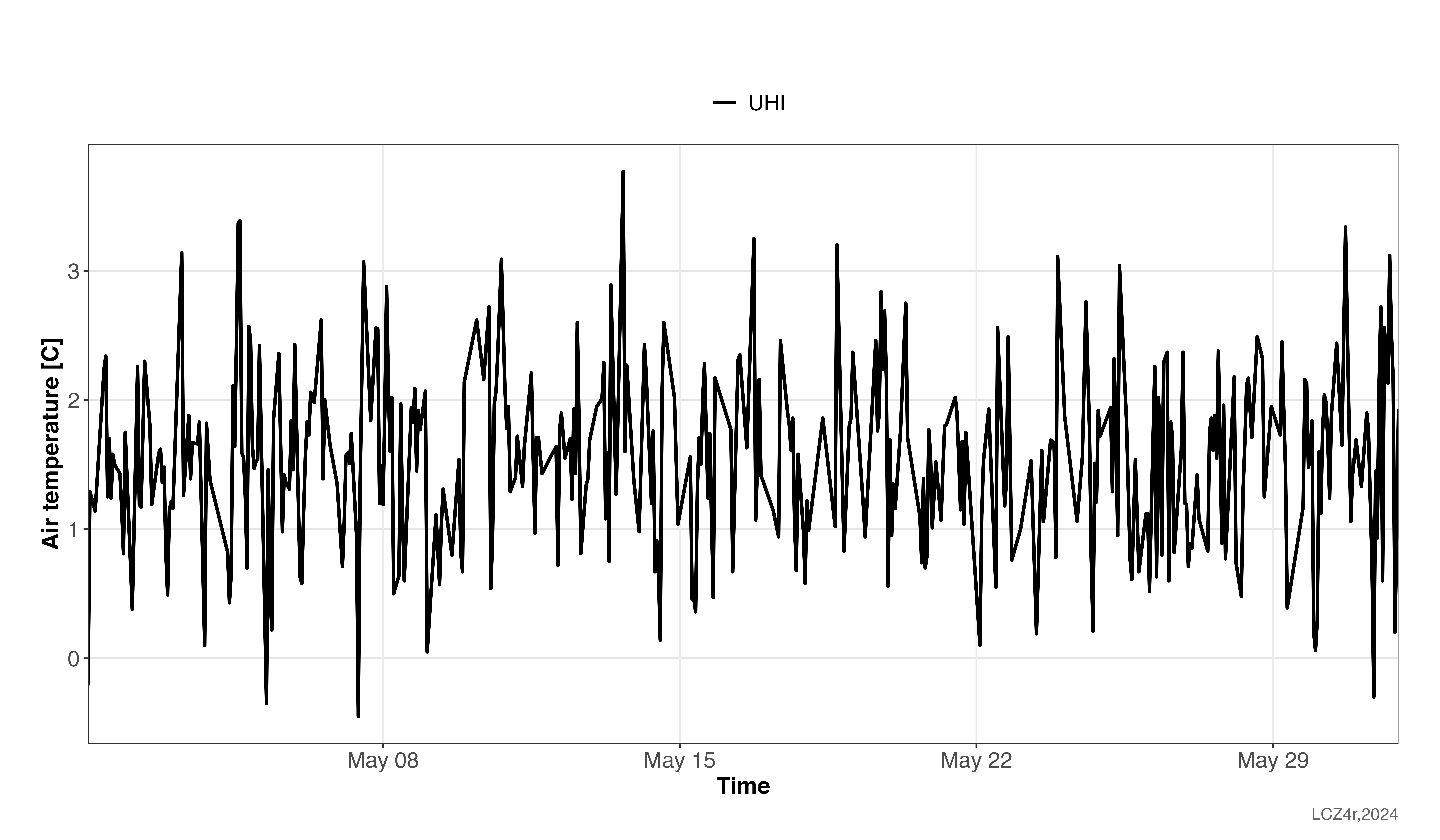
UHI intensity time series for Berlin in May 2023. The highest UHI intensity observed was 3.7°C on May 13 at 16:00, demonstrating the significant urban warming effect.
UHI Spatial Mapping
We modeled the UHI for May 13, 2023, at 16:00 (the time of maximum intensity), using LCZ-based spatial interpolation.
Temperature Map
# Map air temperatures for the peak UHI event
my_interp_map <- lcz_interp_map(
  lcz_map,
  data_frame = data_qc,
  var = "ta_int",
  station_id = "p_id",
  sp.res = 100,
  tp.res = "hour",
  year = 2023, month = 5, day = 13, hour = 16
)

# Customize the plot with titles and labels
lcz_plot_interp(
  my_interp_map,
  title = "Thermal Field - CWS Data",
  subtitle = "Berlin - May 13, 2023 at 16:00",
  caption = "Source: LCZ4r, 2024",
  fill = "Temperature [°C]"
)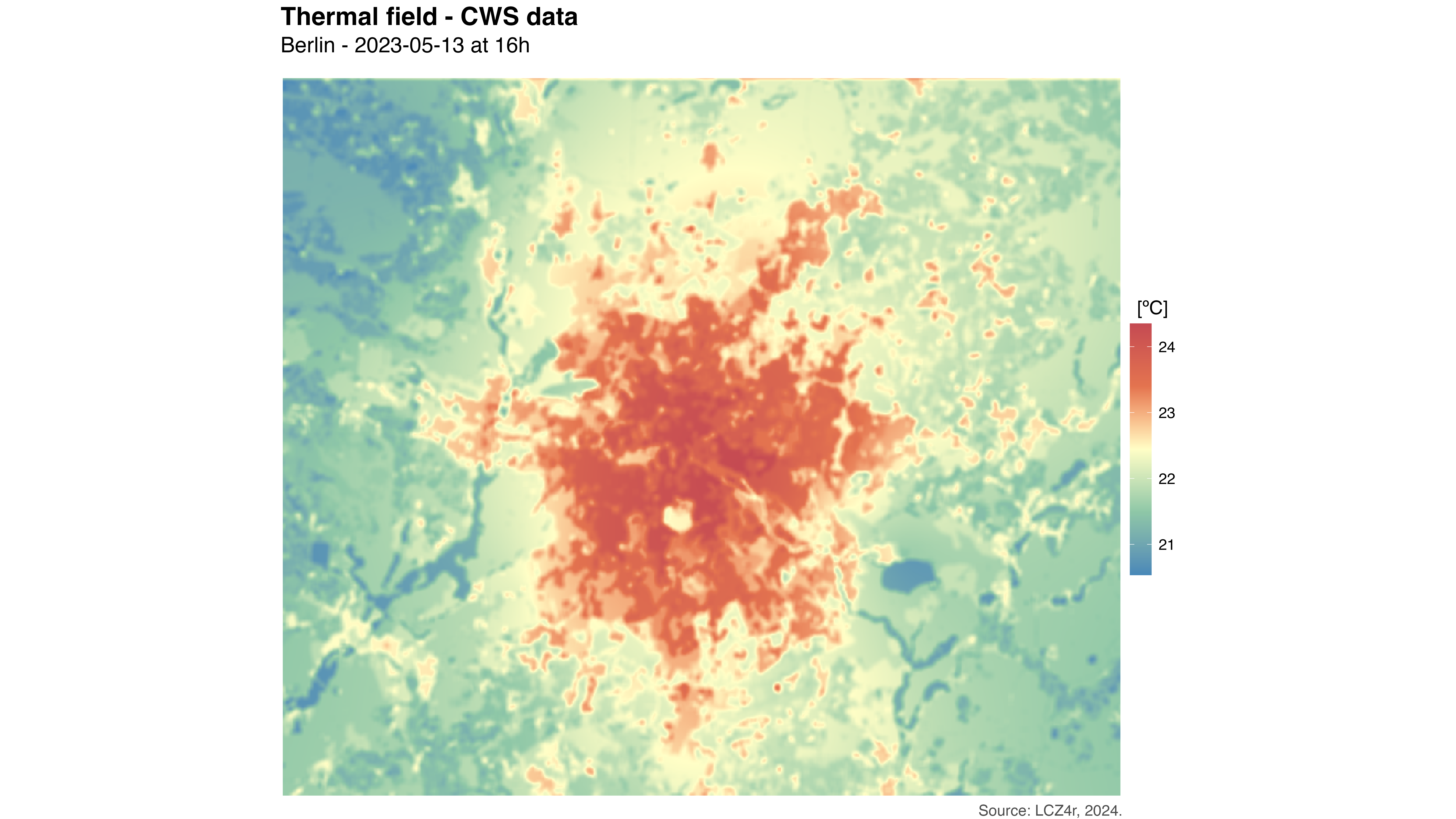
Spatial distribution of air temperature during the peak UHI event on May 13, 2023 at 16:00. The map reveals distinct thermal patterns with warmer temperatures in compact urban areas and cooler temperatures in vegetated and peripheral zones.
Thermal Anomaly Map
# Generate thermal anomaly map for the same event
my_anomaly_map <- lcz_anomaly_map(
  lcz_map,
  data_frame = data_qc,
  var = "ta_int",
  station_id = "p_id",
  sp.res = 100,
  tp.res = "hour",
  year = 2023, month = 5, day = 13, hour = 16
)

# Customize the anomaly plot
lcz_plot_interp(
  my_anomaly_map,
  title = "Thermal Anomaly Field - CWS Data",
  subtitle = "Berlin - May 13, 2023 at 16:00",
  caption = "Source: LCZ4r, 2024",
  fill = "Temperature Anomaly [°C]",
  palette = "bl_yl_rd"
)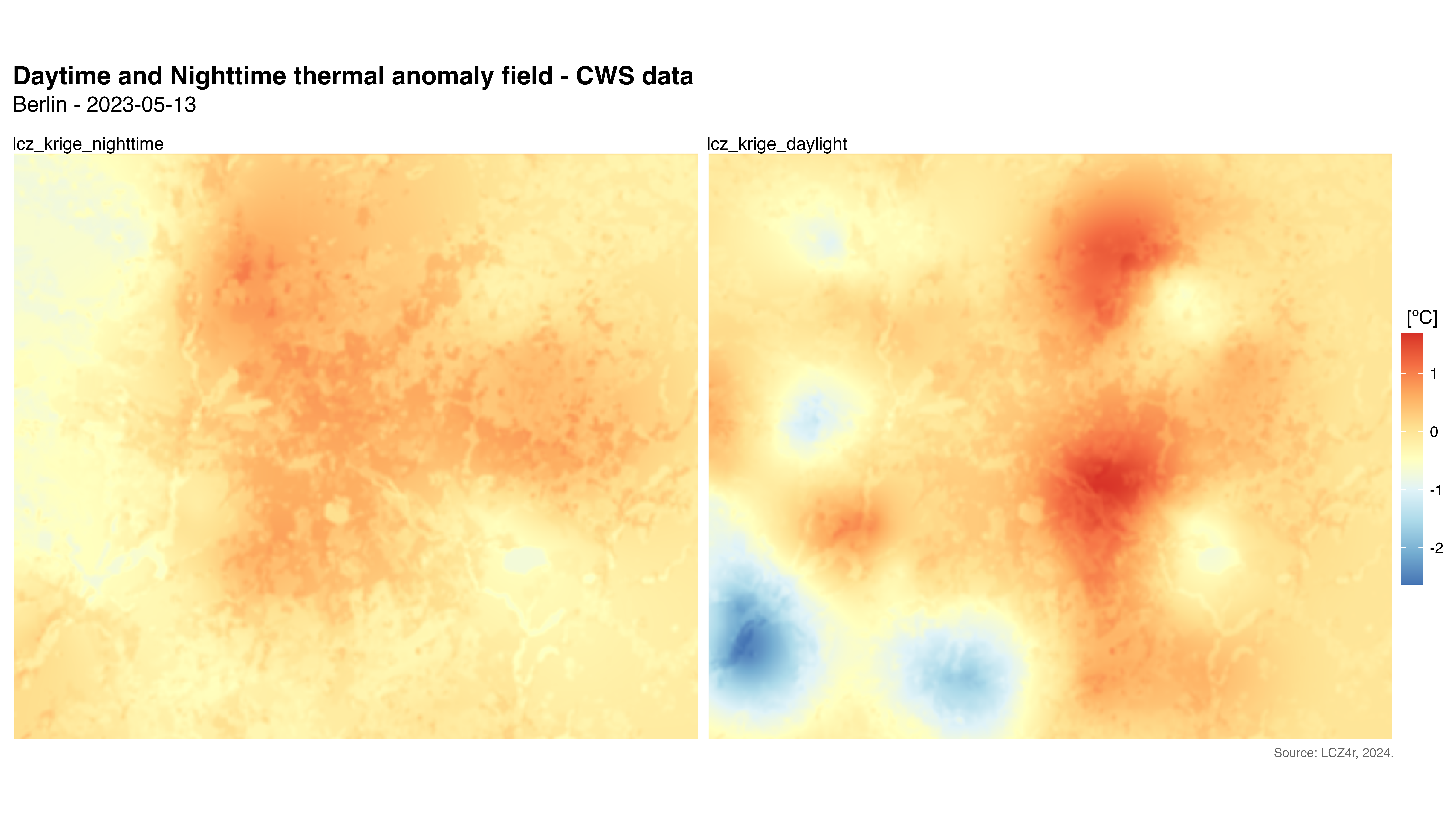
Thermal anomaly map showing deviations from the urban average. Red areas indicate temperatures above average (heat hotspots), while blue areas indicate below-average temperatures (cool spots).
Evaluation of UHI Map Accuracy
We evaluated the interpolation accuracy using Leave-One-Out Cross-Validation (LOOCV) and calculated metrics such as RMSE, MAE, and sMAPE.
Cross-Validation
# Evaluate the interpolation accuracy
df_eval <- lcz_interp_eval(
  lcz_map,
  data_frame = data_qc,
  var = "ta_int",
  station_id = "p_id",
  year = 2023, month = 5, day = 13,
  LOOCV = TRUE,
  extract.method = "two.step",
  sp.res = 500,
  tp.res = "hour",
  vg.model = "Sph",
  LCZinterp = TRUE
)
Evaluation Metrics by LCZ Class
# Calculate evaluation metrics by LCZ class
df_eval_metrics <- df_eval %>%
  group_by(lcz) %>%
  summarise(
    n_obs = n(),                                      # Number of observations
    rmse = sqrt(mean((observed - predicted)^2)),      # RMSE
    mae = mean(abs(observed - predicted)),            # MAE
    smape = mean(2 * abs(observed - predicted) /
                (abs(observed) + abs(predicted)) * 100) # sMAPE
  ) %>%
  arrange(rmse)

# Display the metrics
df_eval_metrics
Correlation Analysis
# Correlation plot with regression equation and R²
p1 <- ggplot(df_eval, aes(x = observed, y = predicted)) +
  geom_point(alpha = 0.3, color = "#1D9E75", size = 1) +
  geom_smooth(method = "lm", color = "red", se = FALSE, linewidth = 1) +
  stat_density2d(aes(fill = after_stat(level)), geom = "polygon", alpha = 0.3) +
  scale_fill_viridis_c(option = "viridis", name = "Density") +
  stat_poly_eq(
    aes(label = paste(..eq.label.., ..rr.label.., sep = "~~~")),
    formula = y ~ x,
    parse = TRUE,
    label.x.npc = "left",
    label.y.npc = "top",
    size = 4
  ) +
  labs(
    title = "Observed vs. Predicted Temperatures",
    x = "Observed Temperature [°C]",
    y = "Predicted Temperature [°C]"
  ) +
  theme_minimal(base_size = 14) +
  theme(
    plot.title = element_text(size = 16, face = "bold", hjust = 0.5),
    axis.title = element_text(face = "bold")
  )

# Add marginal histograms
p1_with_marginals <- ggMarginal(p1,
                                 type = "histogram",
                                 fill = "#1D9E75",
                                 bins = 30,
                                 alpha = 0.6)

# Print the plot
p1_with_marginals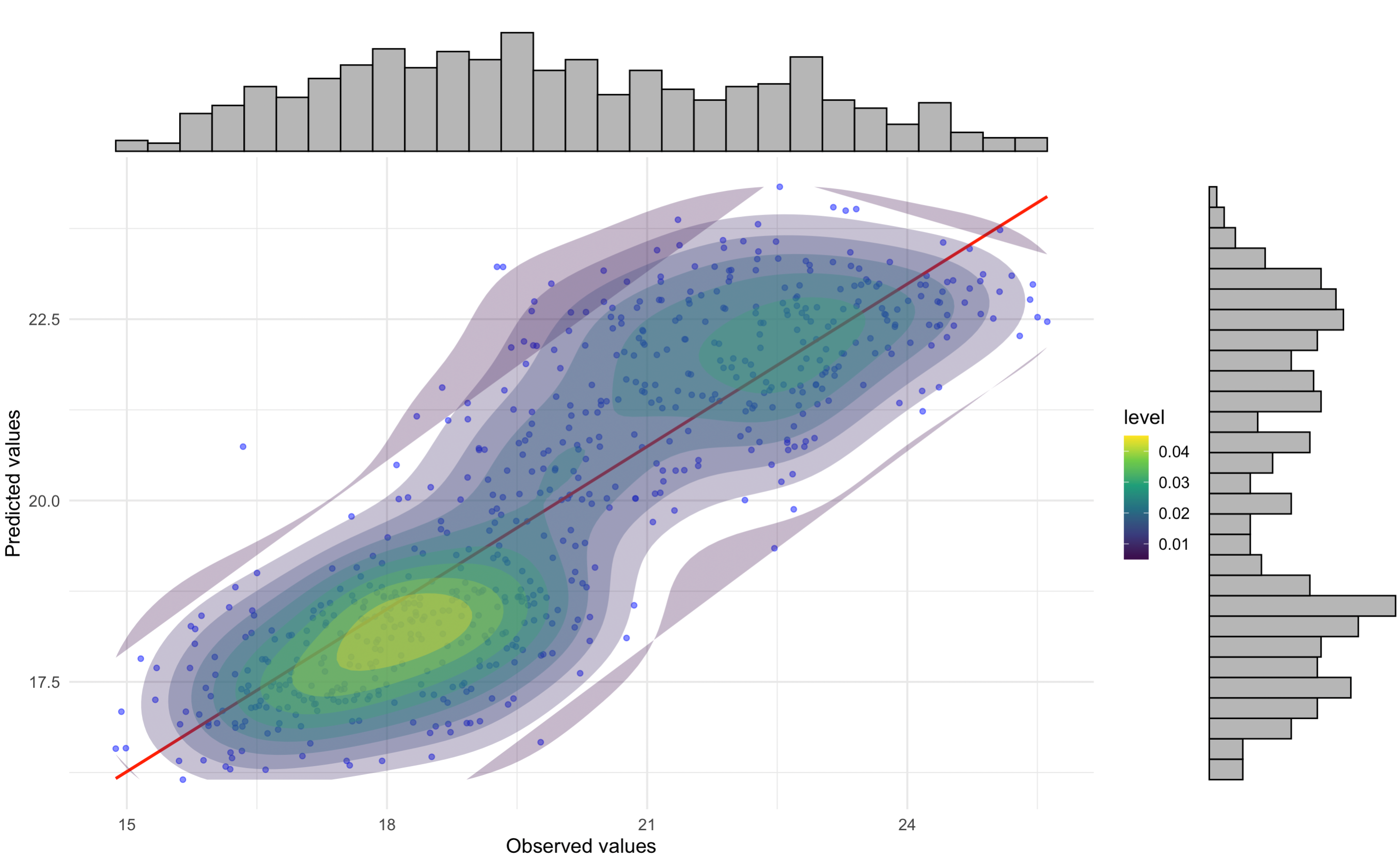
Correlation between observed and predicted temperatures from crowdsourced data. The high R² value indicates good model performance, demonstrating the reliability of crowdsourced data after QC.
Residual Analysis by LCZ Class
# Residuals plot by LCZ class
p2 <- ggplot(df_eval, aes(x = observed, y = residual)) +
  geom_point(alpha = 0.3, color = "darkgreen", size = 1) +
  geom_hline(yintercept = 0, linetype = "dashed", color = "red", linewidth = 0.8) +
  geom_smooth(method = "loess", color = "blue", se = FALSE, linewidth = 1) +
  stat_density2d(aes(fill = after_stat(level)), geom = "polygon", alpha = 0.3) +
  scale_fill_viridis_c(option = "plasma", direction = -1, name = "Density") +
  facet_wrap(~ lcz, scales = "free", ncol = 3) +
  labs(
    title = "Residuals by LCZ Class",
    x = "Observed Temperature [°C]",
    y = "Residuals [°C]"
  ) +
  theme_minimal(base_size = 12) +
  theme(
    plot.title = element_text(size = 16, face = "bold", hjust = 0.5),
    axis.title = element_text(face = "bold"),
    strip.text = element_text(size = 12, face = "bold"),
    legend.position = "right",
    panel.grid.major = element_line(color = "gray90", linetype = "dotted"),
    panel.grid.minor = element_blank()
  )

# Print the plot
p2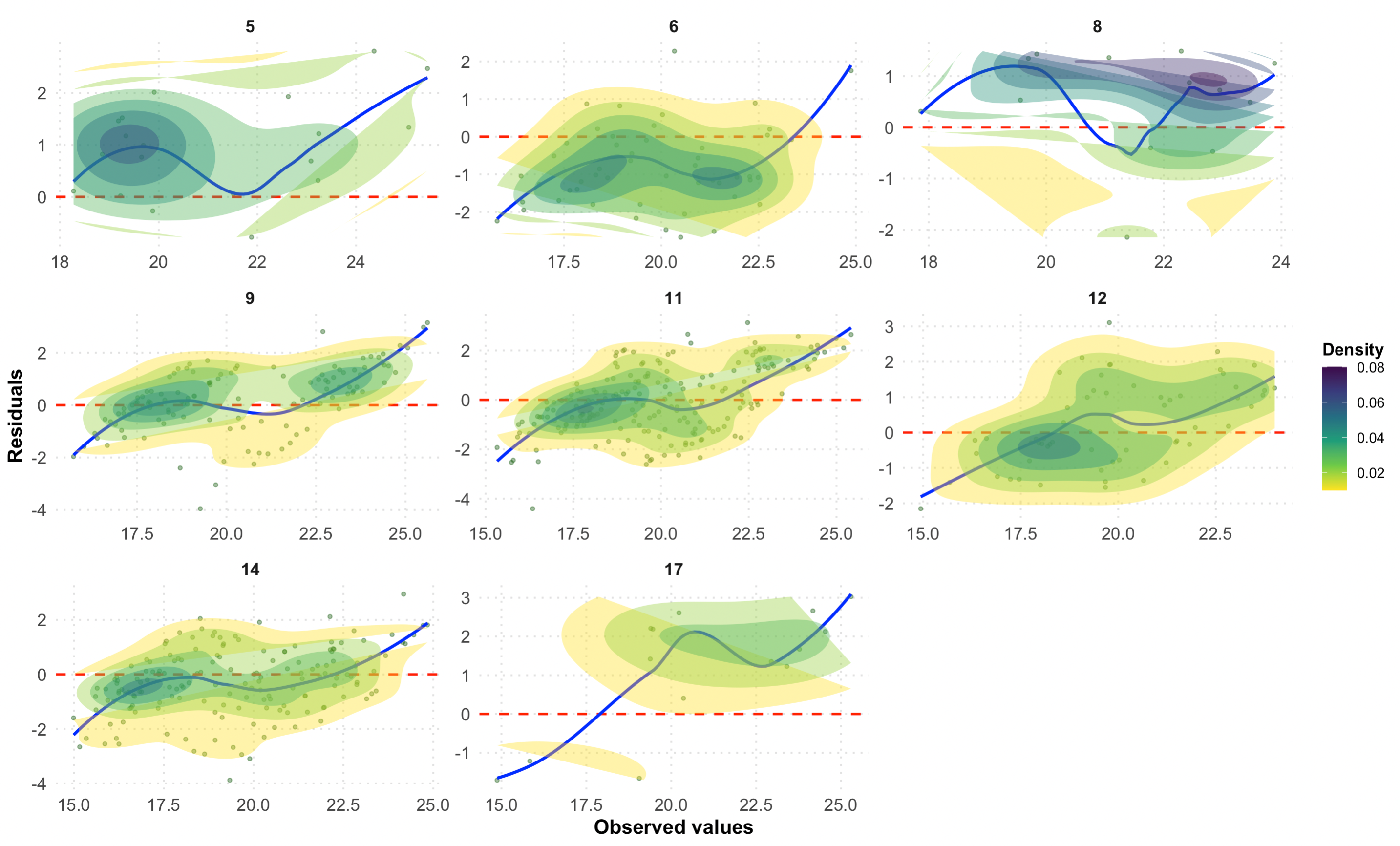
Residuals by LCZ class for the crowdsourced data evaluation. The random scatter around zero indicates good model performance across different urban forms.
Key Findings and Discussion
Summary of Results
| Metric | Value | Interpretation |
|---|---|---|
| Peak UHI Intensity | 3.7°C | Significant urban warming effect |
| Overall RMSE | ~0.8-1.2°C | Good prediction accuracy |
| Best Performing LCZ | Open low-rise | Well-represented in training data |
| Challenging LCZ | Compact mid-rise | Higher spatial variability |
Advantages of Crowdsourced Data
- High Spatial Resolution: Hundreds of stations provide detailed urban thermal patterns
- Real-time Monitoring: Captures rapid temperature changes
- Cost-Effective: Leverages existing citizen infrastructure
- Complementary: Fills gaps in official monitoring networks
Quality Control Benefits
The CrowdQCplus QC process successfully: - Identified and removed statistically implausible readings - Reduced noise in the temperature signal - Improved correlation between observed and predicted values - Enhanced spatial pattern detection
Practical Applications
- Heatwave Early Warning: Identify areas at highest risk during extreme heat events
- Urban Planning: Inform green infrastructure placement based on thermal patterns
- Climate Adaptation: Evaluate effectiveness of mitigation strategies
- Public Health: Target interventions in heat-vulnerable areas
Save Results
# Save evaluation metrics to CSV
write.csv(df_eval_metrics,
          file = "cws_uhi_metrics_may2023.csv",
          row.names = FALSE)

# Save full evaluation data frame
write.csv(df_eval,
          file = "cws_uhi_evaluation_may2023.csv",
          row.names = FALSE)

# Save plots
ggsave("cws_correlation_plot.png", p1_with_marginals, width = 10, height = 8, dpi = 300)
ggsave("cws_residuals_by_lcz.png", p2, width = 12, height = 10, dpi = 300)
Have feedback or suggestions?
Do you have an idea for improvement or did you spot a mistake? We’d love to hear from you! Click the button below to create a new issue (GitHub) and share your feedback or suggestions directly with us.
Open GitHub issue