Time Series Analysis
Max Anjos
September 18, 2026
Source:vignettes/local_func_time_series.Rmd
local_func_time_series.RmdGetting Started
The lcz_ts() function allows you to analyze air
temperature data associated with Local Climate Zones (LCZ) over time. In
this tutorial, we’ll perform an hourly frequency analysis of air
temperature in Berlin for the years 2019-2020 using
lcz_data from the LCZ4r package.
library(LCZ4r)

# Get the LCZ map for your city
lcz_map <- lcz_get_map_euro(city = "Berlin")

# Load sample data from LCZ4r
data("lcz_data")
Basic Time Series Analysis
Let’s start with a basic analysis using lcz_ts() to
observe hourly temperature fluctuations.
# Get monthly LCZ-air temperature time series
lcz_ts(lcz_map,
       data_frame = lcz_data,
       var = "airT",
       station_id = "station",
       time.freq = "month",
       ylab = "Air temperature [°C]",
       xlab = "Date",
       title = "LCZ - Time Series",
       caption = "Source: LCZ4r, 2024.")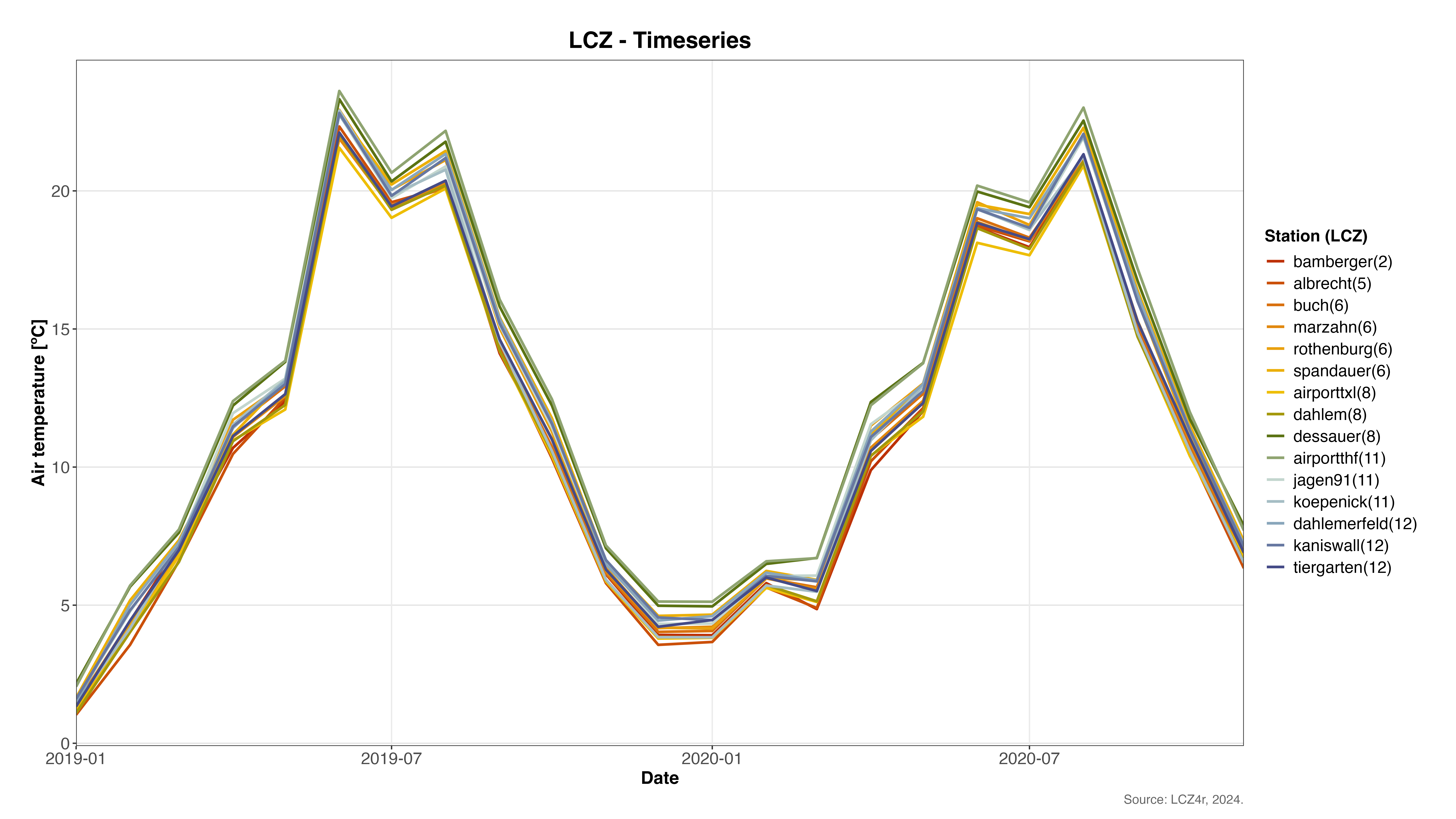
Monthly LCZ-air temperature time series for Berlin showing seasonal temperature variations across different LCZ classes
Plotting Options with plot_type
The plot_type argument in lcz_ts() offers
several visualizations:
- “basic_line”: Simple line plot
- “faceted_line”: Line plot with facets by LCZ or station
- “heatmap”: Heatmap to visualize temporal patterns
- “warming_stripes”: Stripes representing temperature variations over time
Below are examples using each plot type.
1. Basic Line Plot
# Daily air temperature for September 2019
lcz_ts(lcz_map,
       data_frame = lcz_data,
       var = "airT",
       station_id = "station",
       time.freq = "day",
       year = 2019, month = 9,
       plot_type = "basic_line")
Basic line plot showing daily temperature variations in Berlin during September 2019
2. Faceted Line Plot by Station
# Daily air temperature from January to March 2019, faceted by station
lcz_ts(lcz_map,
       data_frame = lcz_data,
       var = "airT",
       station_id = "station",
       time.freq = "hour",
       year = 2019, month = 1:3,
       plot_type = "facet_line",
       facet = "station")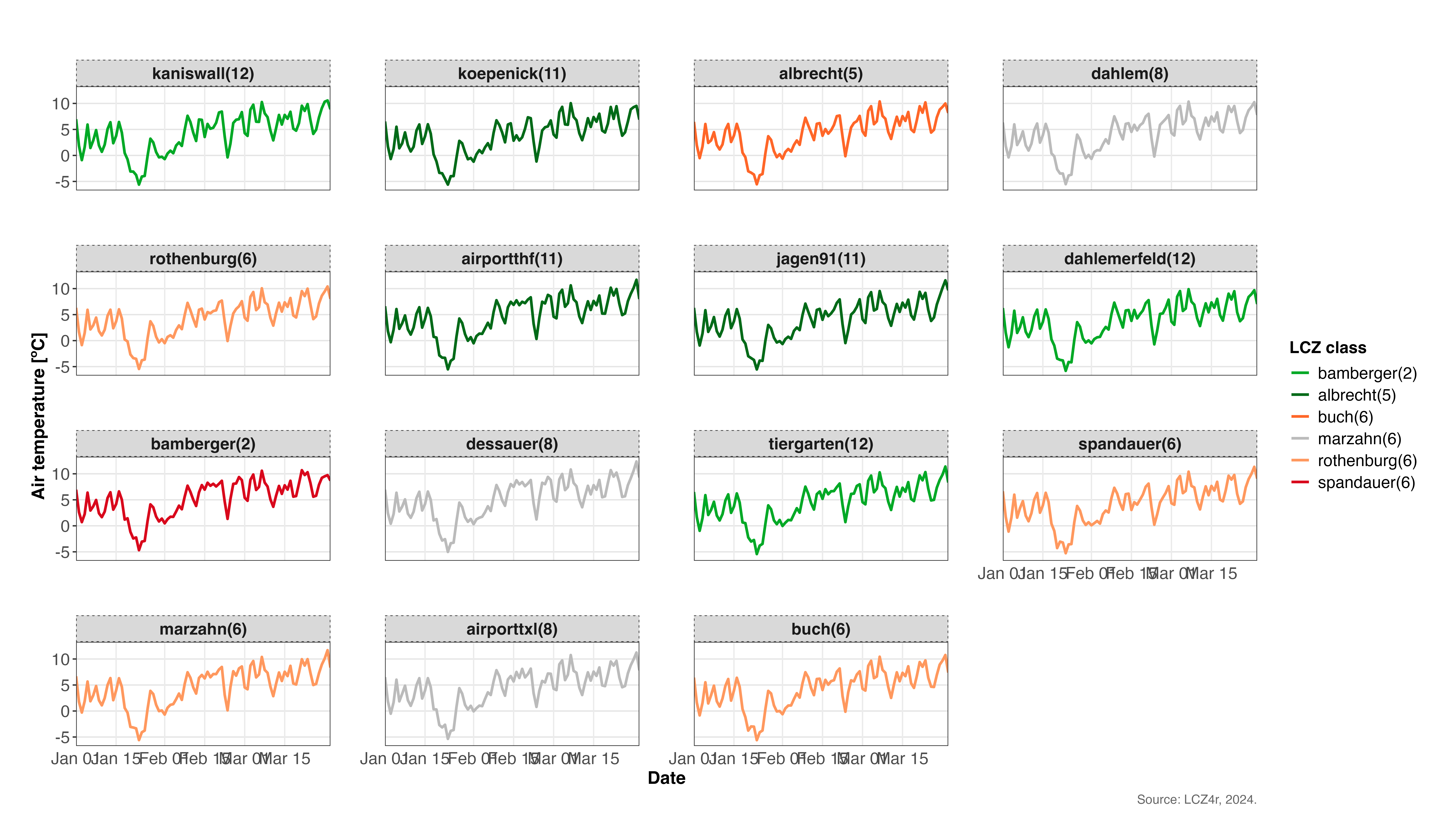
Faceted line plot showing temperature patterns across different meteorological stations in Berlin (January-March 2019)
3. Heatmap of Temperature Over Time
# Hourly air temperature on January 15, 2020, with LCZ facets
lcz_ts(lcz_map,
       data_frame = lcz_data,
       var = "airT",
       station_id = "station",
       time.freq = "hour",
       year = 2020, month = 1, day = 15,
       plot_type = "heatmap",
       facet = "LCZ")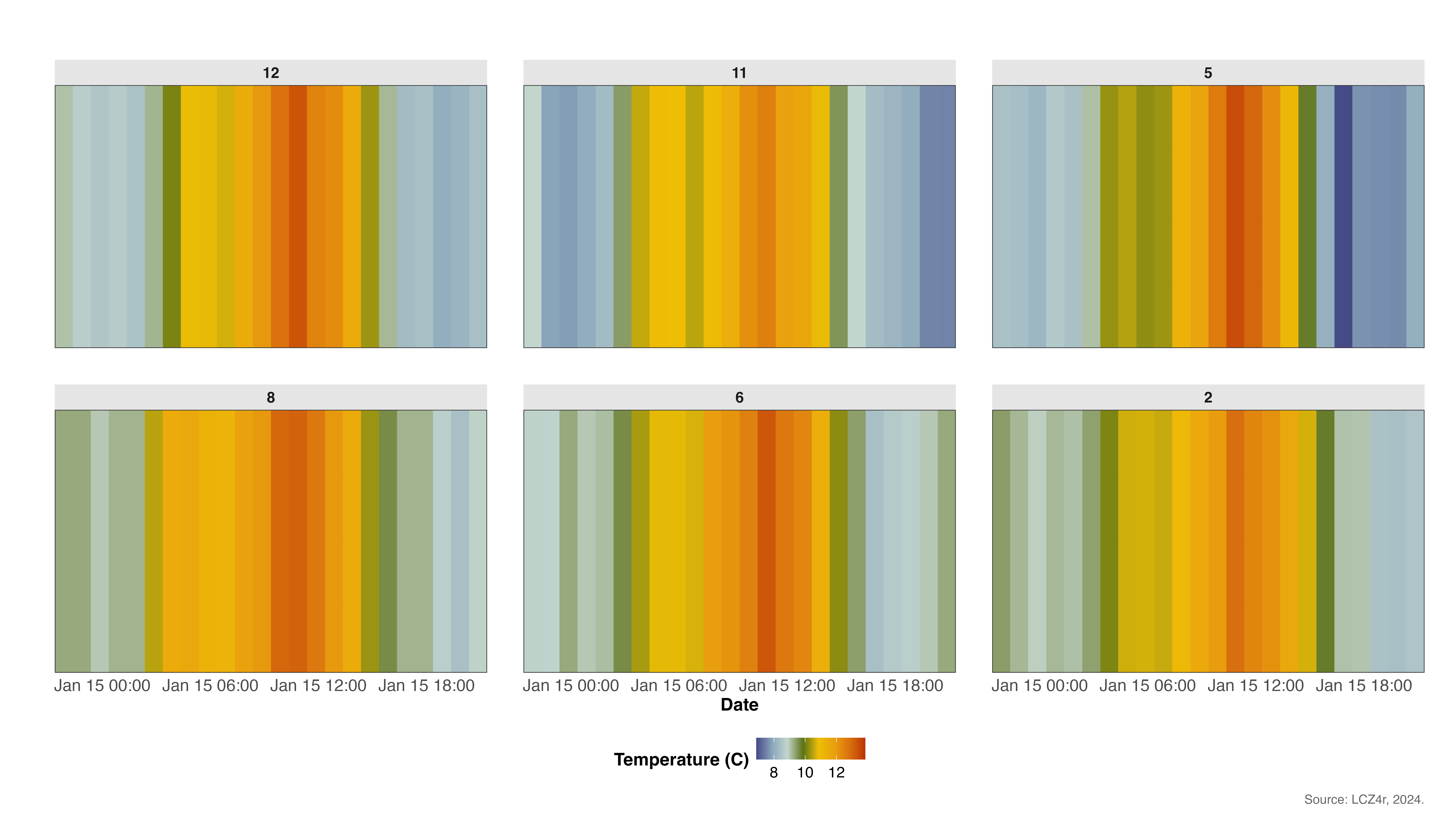
Heatmap showing hourly temperature variations across different LCZ classes on January 15, 2020
4. Warming Stripes
# Hourly air temperature for 2020, visualized as warming stripes
lcz_ts(lcz_map,
       data_frame = lcz_data,
       var = "airT",
       station_id = "station",
       time.freq = "hour",
       year = 2020, month = 1:12,
       plot_type = "warming_stripes",
       facet = "LCZ")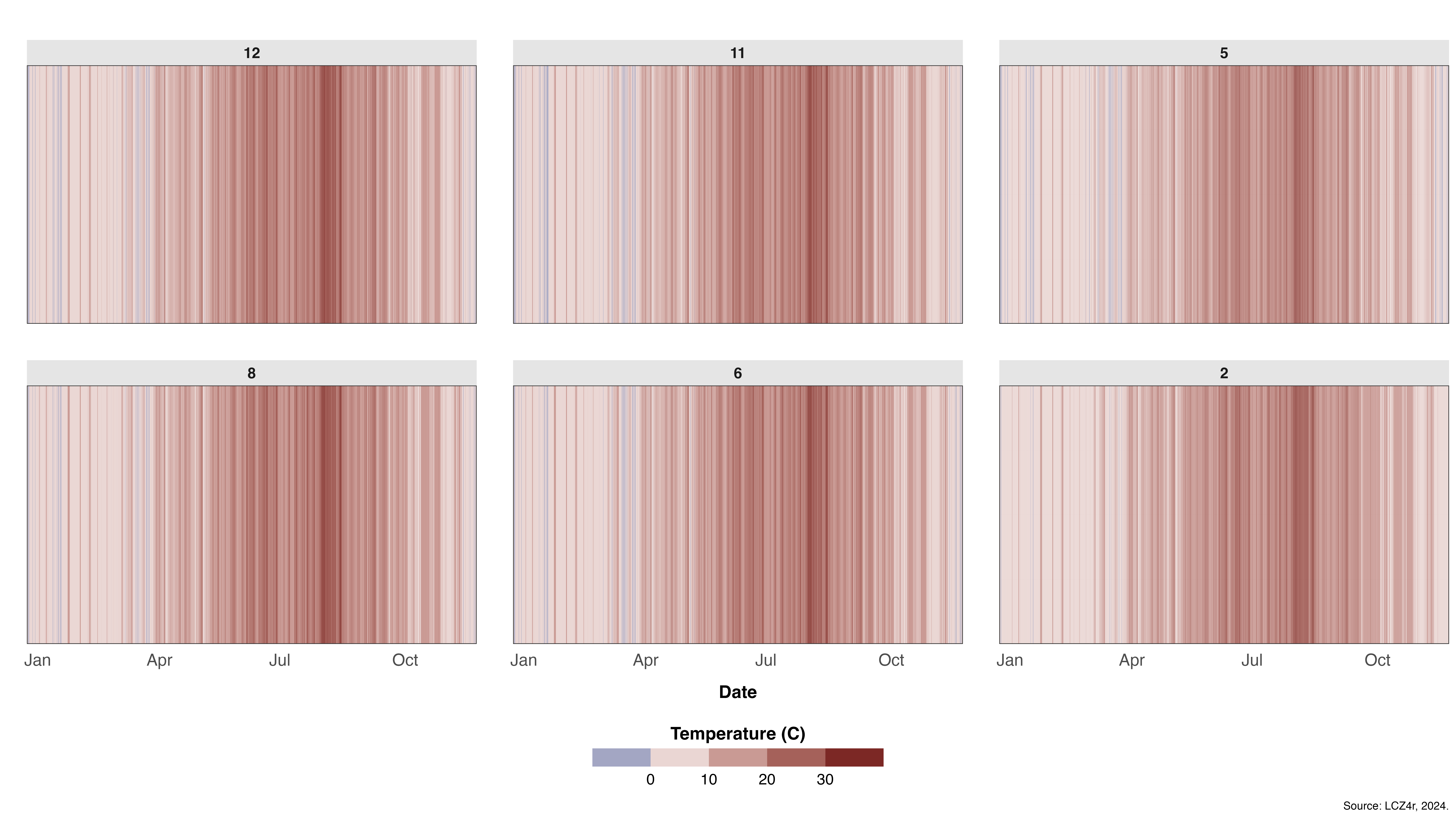
Warming stripes visualization showing temperature trends across different LCZ classes throughout 2020
Splitting Data with the “by” Argument
You can split data by temporal or spatial categories such as “year”, “month”, “season”, “weekday”, “weekend”, “yearseason”, and more.
# Daily air temperature by seasons of 2020
lcz_ts(lcz_map,
       data_frame = lcz_data,
       var = "airT",
       station_id = "station",
       time.freq = "day",
       year = 2020,
       plot_type = "basic_line",
       by = "season")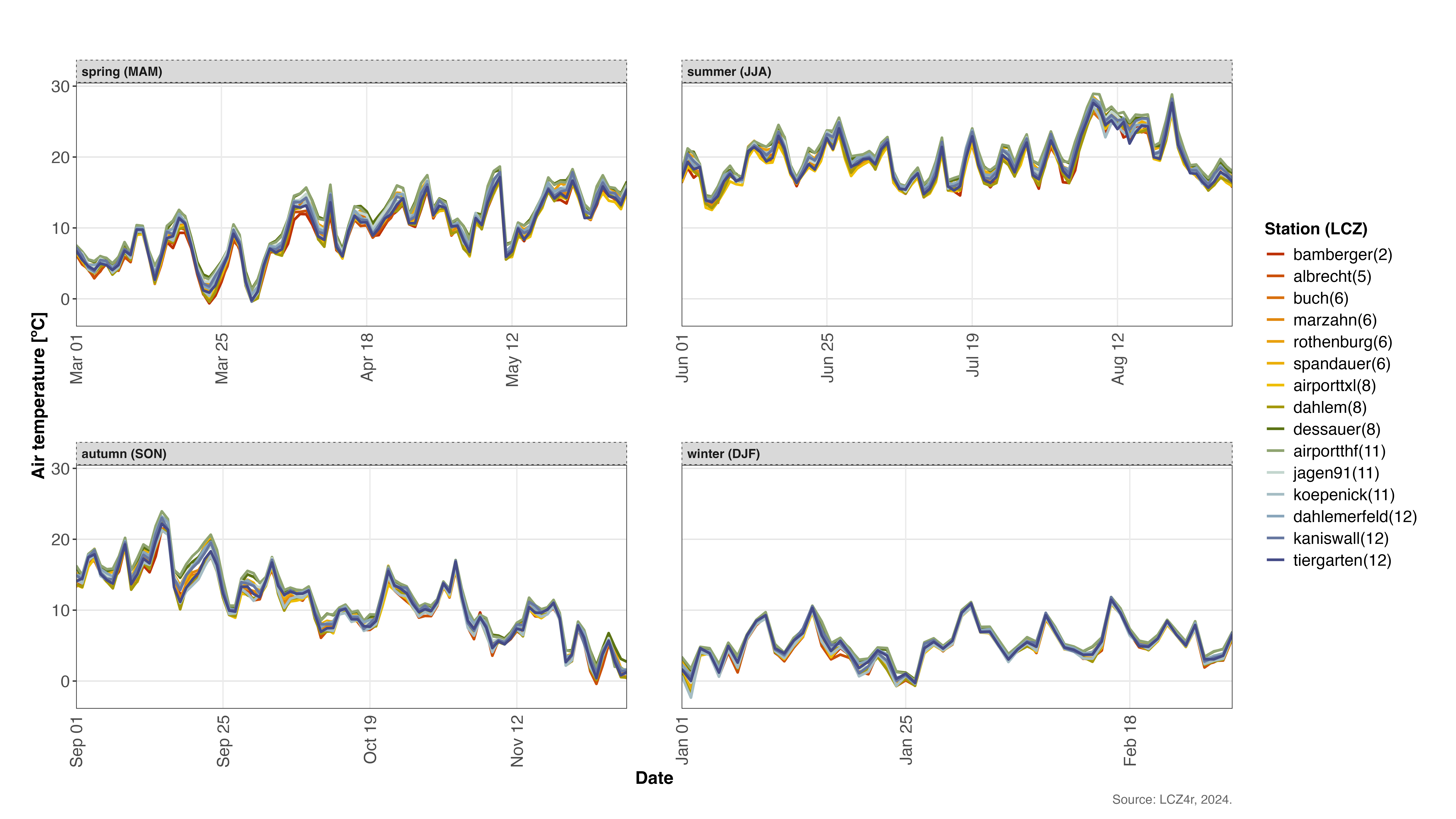
Temperature variations across different seasons in Berlin during 2020
Dividing Nighttime and Daytime with “by” Argument
You can also split data by nighttime and daytime periods with
by = "daylight".
# Diurnal cycle of air temperature on January 15, 2020
lcz_ts(lcz_map,
       data_frame = lcz_data,
       var = "airT",
       station_id = "station",
       time.freq = "hour",
       year = 2020, month = 1, day = 15,
       plot_type = "heatmap",
       by = "daylight")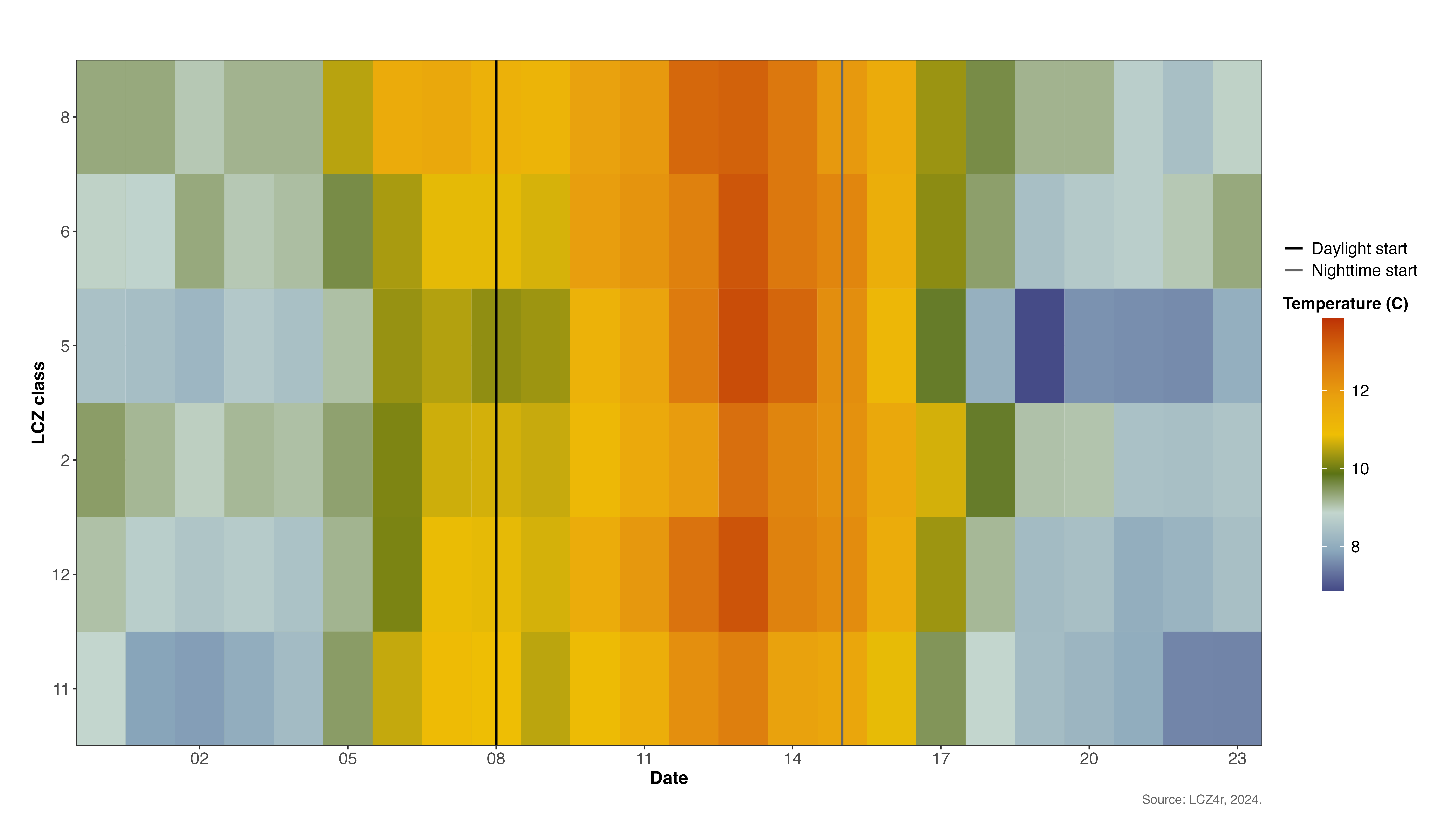
Comparison of daytime and nighttime temperature patterns on January 15, 2020
Combining Daylight with Months
# Diurnal cycle of air temperature on January 15 and July 15, 2020
lcz_ts(lcz_map,
       data_frame = lcz_data,
       var = "airT",
       station_id = "station",
       time.freq = "hour",
       year = 2020, month = c(1, 7), day = 15,
       plot_type = "basic_line",
       by = c("daylight", "monthyear"))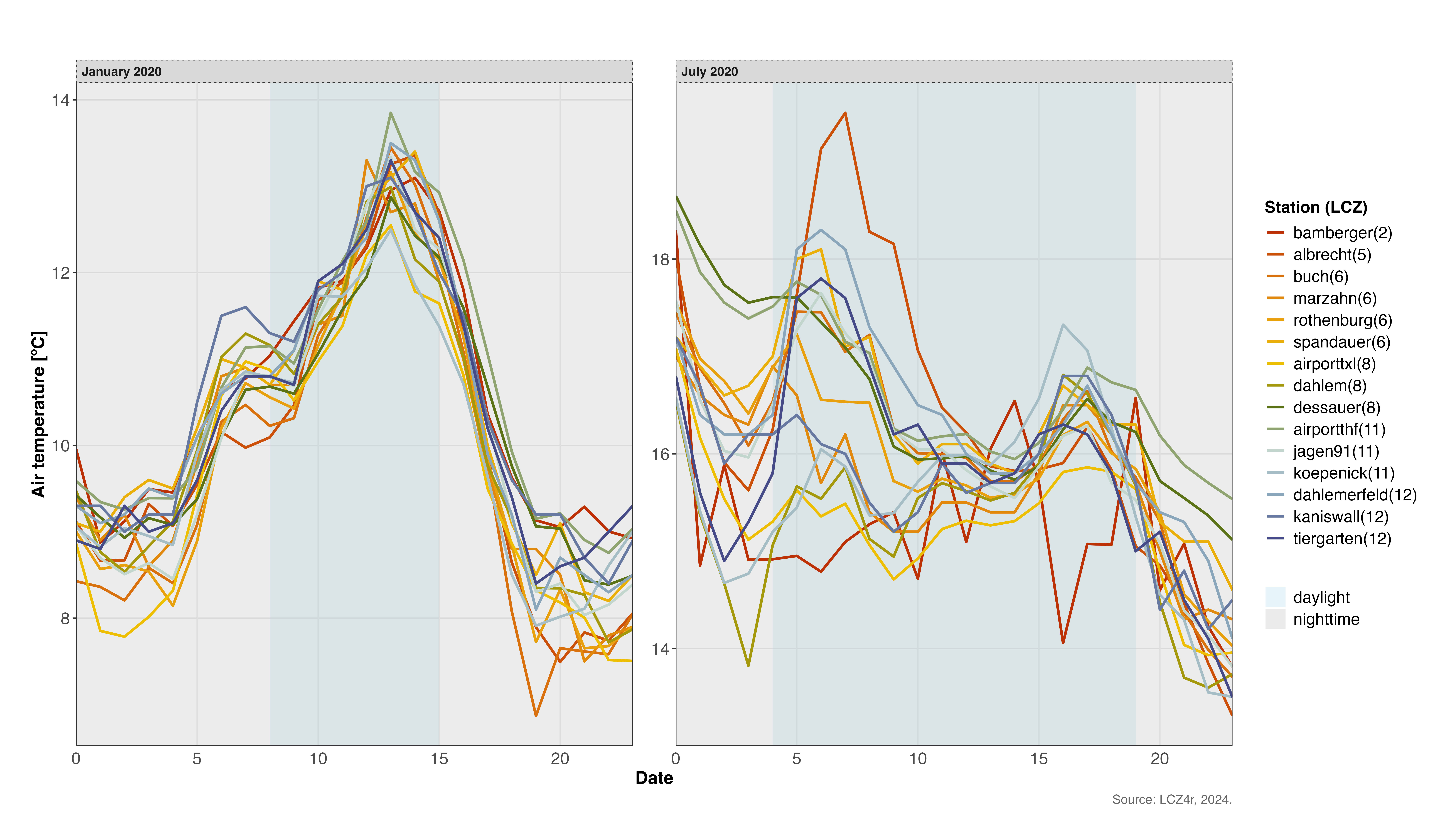
Comparison of diurnal temperature cycles in winter (January) and summer (July) 2020
Smoothing Temperature Trends
Enable smoothing by setting smooth = TRUE, which adds a
generalized additive model (GAM) line to show the temperature trend.
# Trends of daily air temperature for 2019-2020 by station
lcz_ts(lcz_map,
       data_frame = lcz_data,
       var = "airT",
       station_id = "station",
       time.freq = "hour",
       year = 2019:2020,
       plot_type = "basic_line",
       smooth = TRUE)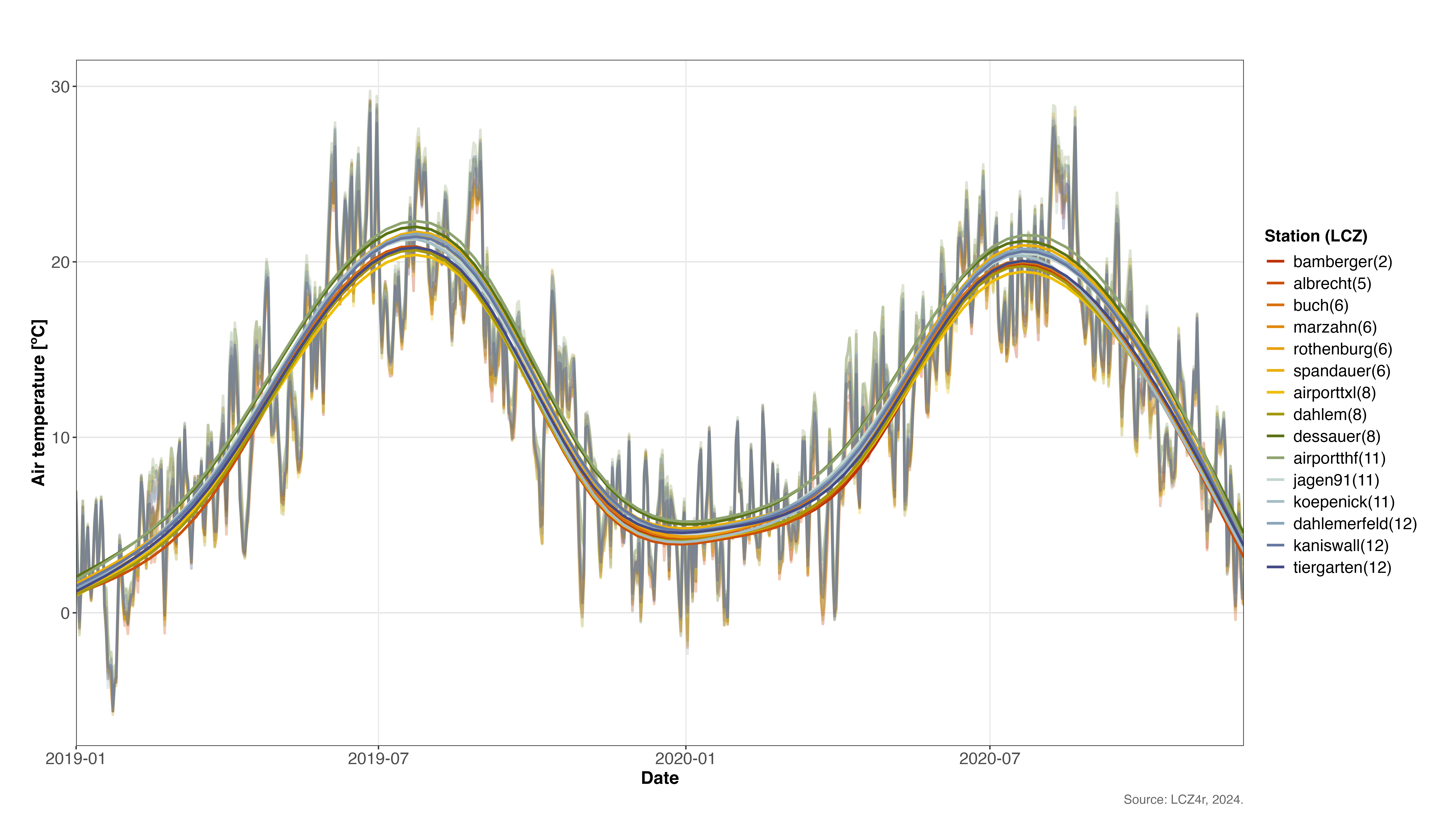
Temperature trends with GAM smoothing across stations for 2019-2020
Save Plots
To save a plot and dataframe, set isave = TRUE and
specify the file type with save_extension (e.g., “png”,
“jpeg”, “svg”, “pdf”). A folder LCZ4r_output is created on
your PC.
# Save daylight plot and dataframe to PC
lcz_ts(lcz_map,
       data_frame = lcz_data,
       var = "airT",
       station_id = "station",
       time.freq = "hour",
       year = 2020, month = 1, day = 15,
       plot_type = "basic_line",
       by = "daylight",
isave = TRUE)Tip: The saved files will be automatically organized
in the LCZ4r_output folder with timestamped filenames for
easy reference.
Return a Dataframe as Result
To save the result in R, set iplot = FALSE and create an
object.
# Return daylight dataframe for January 15, 2020
my_output <- lcz_ts(lcz_map,
                    data_frame = lcz_data,
                    var = "airT",
                    station_id = "station",
                    time.freq = "hour",
                    year = 2020, month = 1, day = 15,
                    plot_type = "basic_line",
                    by = "daylight",
                    iplot = FALSE)

# View the structure of the returned dataframe
str(my_output)
Summary of Parameters
Here’s a quick reference for the main parameters used in
lcz_ts():
| Parameter | Description | Options |
|---|---|---|
time.freq |
Temporal aggregation frequency | “hour”, “day”, “month”, “year” |
plot_type |
Visualization type | “basic_line”, “facet_line”, “heatmap”, “warming_stripes” |
by |
Data splitting method | “season”, “month”, “weekday”, “daylight”, “yearseason” |
smooth |
Add GAM trend line | TRUE/FALSE |
isave |
Save output to PC | TRUE/FALSE |
iplot |
Display plot | TRUE/FALSE |
Have feedback or suggestions?
Do you have an idea for improvement or did you spot a mistake? We’d love to hear from you! Click the button below to create a new issue (GitHub) and share your feedback or suggestions directly with us.
Open GitHub issue