利用LCZ进行温度建模
Max Anjos
September 18, 2026
Source:vignettes/local_func_modeling.Rmd
local_func_modeling.Rmd介绍
了解城市环境内的温度变化对于气候研究至关重要,特别是在研究城市热岛
(UHI) 时。 LCZ4r 软件包提供了强大的功能,用于在当地气候带 (LCZ)
内创建插值地图和热异常分析。这 lcz_interp_map() 和
lcz_anomaly_map()
函数可用于生成气温的详细空间表示,使研究人员能够分析城市结构和土地利用对当地气候的影响。
在本指南中,我们将演示如何使用这些函数对柏林 LCZ 的温度数据进行建模,包括:
- 使用 LCZ 类别对气温进行空间插值
- 热异常测绘以识别热点和冷点
- 不同时间尺度的时间分析
- 空间分辨率和可视化的定制选项
library(LCZ4r)

# 获取您所在城市的LCZ地图
lcz_map <- lcz_get_map_euro(city = "Berlin")

# 从LCZ4r加载样本数据
data("lcz_data")
了解 LCZ 空间插值:
LCZ4r 中的插值函数使用克里金法,这是一种考虑空间自相关来估计未测量位置的温度的地统计技术。通过整合 LCZ 类别,插值可以解释不同城市形态的热特性,从而产生更真实的温度分布。
关键参数: - sp.res:以米为单位的空间分辨率(默认值:100 m) - tp.res:时间聚合频率(小时、天、月) - by:按时间或分类变量拆分分析
插值气温
这 lcz_interp_map() 函数根据 LCZ
类别生成插值空气温度图。这些函数应用插值技术来估计整个研究区域的温度。
单小时地图插值
以下示例演示如何生成特定日期和时间的温度图。
# 绘制2019年2月6日05:00的气温图
my_interp_map <- lcz_interp_map(lcz_map,
                                data_frame = lcz_data,
                                var = "airT",
                                station_id = "station",
                                sp.res = 100,
                                tp.res = "hour",
                                year = 2019, month = 2, day = 6, hour = 5)

# 使用标题和标签自定义图表
lcz_plot_interp(my_interp_map,
                title = "LCZ Air Temperature Distribution",
                subtitle = "Berlin - February 6, 2019 at 05:00",
                caption = "Source: LCZ4r, 2024",
                fill = "Temperature [°C]")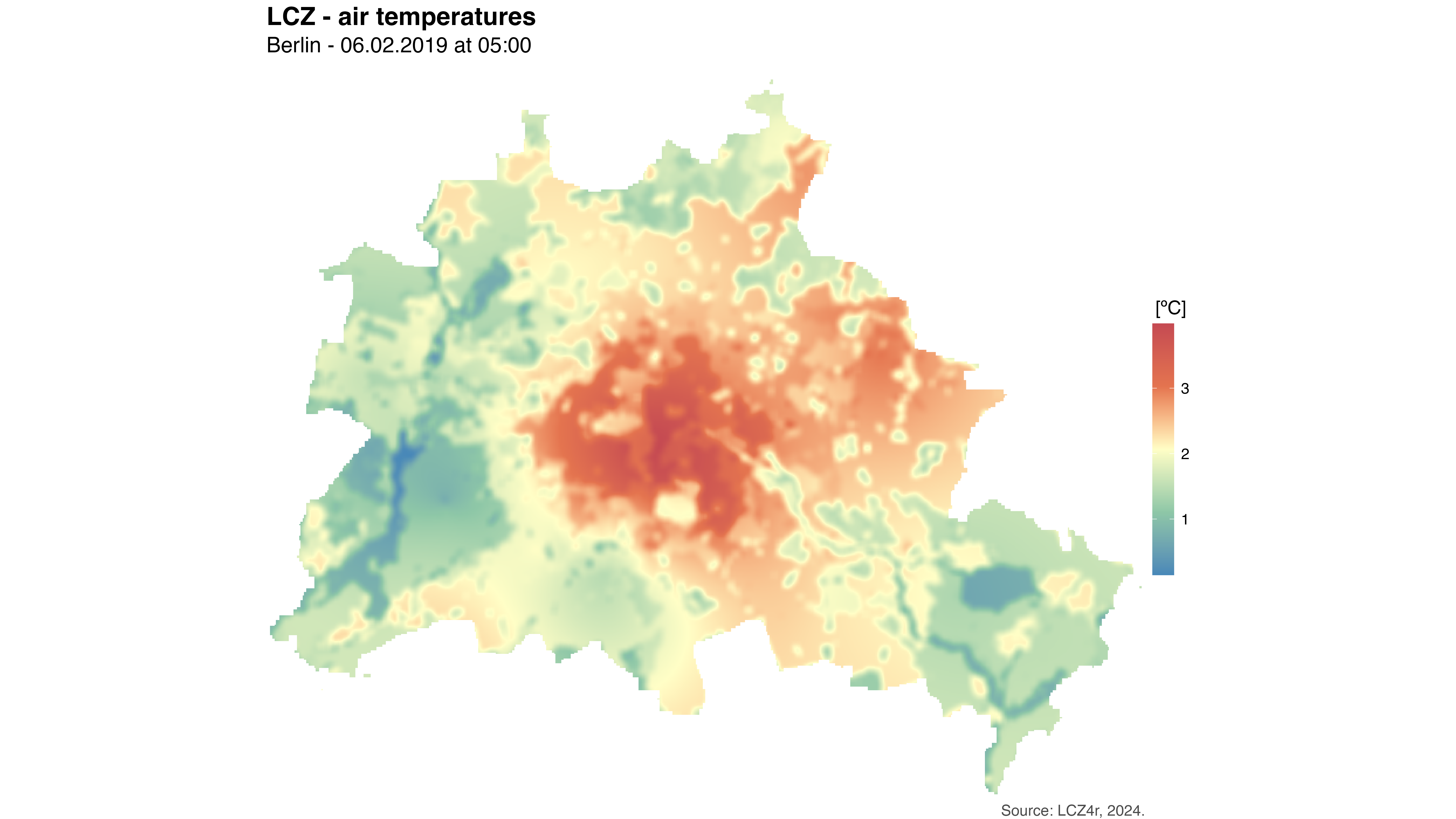
2019 年 2 月 6 日 05:00 柏林气温的空间插值。该地图显示了不同 LCZ 类别的温度变化,较温暖的区域通常对应于紧凑的建筑区域。
一天内每小时插值
这 by = "hour"
参数允许您生成特定日期的一系列每小时温度图,每个小时表示为一个单独的栅格图层。
# 生成全天每小时温度图
my_interp_map <- lcz_interp_map(lcz_map,
                                data_frame = lcz_data,
                                var = "airT",
                                station_id = "station",
                                sp.res = 100,
                                tp.res = "hour",
                                year = 2019, month = 2, day = 6,
                                by = "hour")

# 将栅格图层重命名为带有小时数字的名称
names(my_interp_map) <- paste0("Hour ", 1:24)

# 可视化所有小时地图
lcz_plot_interp(my_interp_map,
                title = "Hourly LCZ Air Temperature Patterns",
                subtitle = "Berlin - February 6, 2019",
                caption = "Source: LCZ4r, 2024",
                fill = "Temperature [°C]")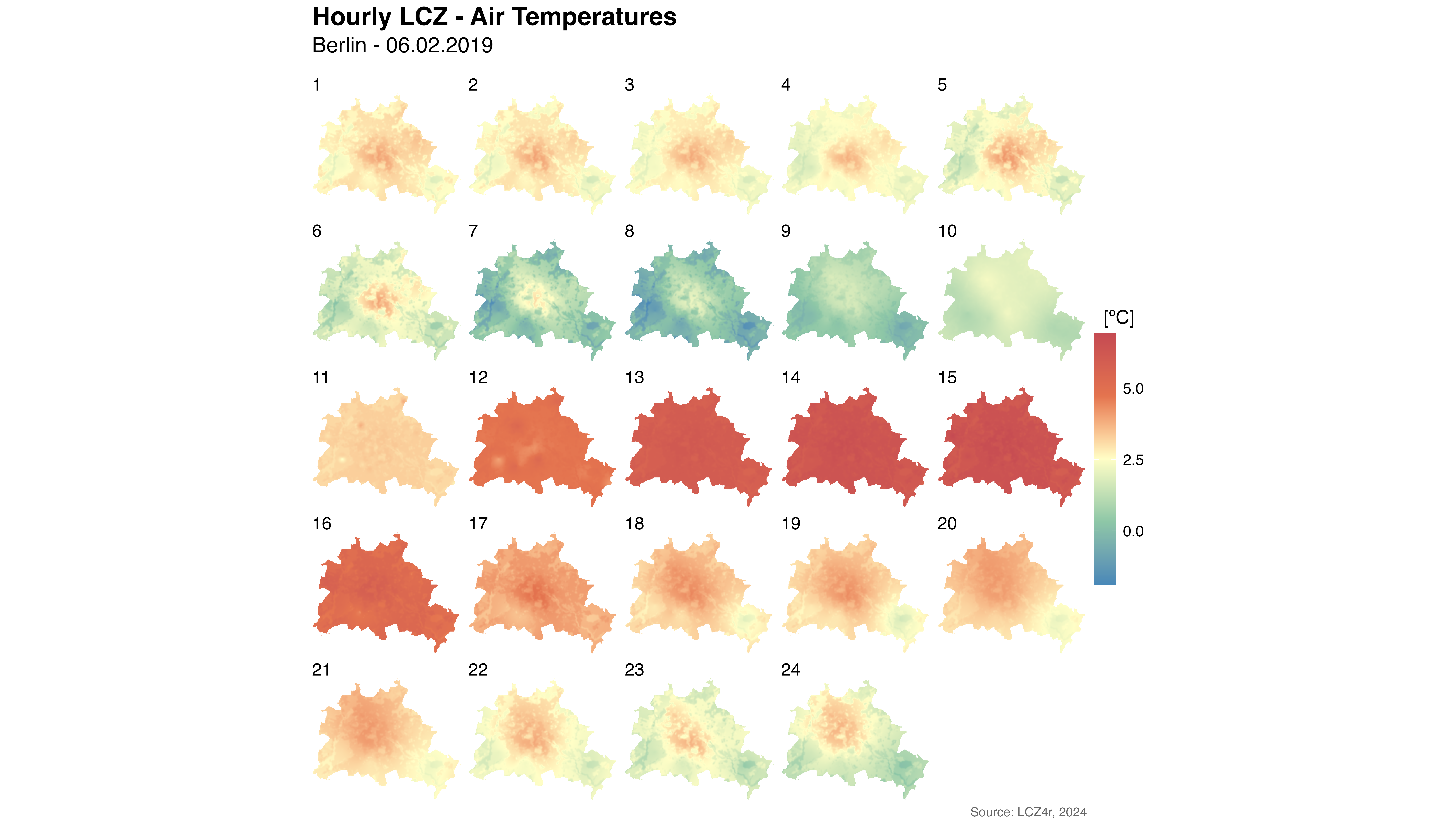
2019 年 2 月 6 日每小时的温度插值序列,显示了柏林 LCZ 级别温度模式的日变化。
热异常插值
这 lcz_anomaly_map() 函数突出显示了相对于 LCZ
平均条件的温度异常。异常图对于识别温度与典型值显着不同的区域特别有用,例如城市地区的热点地区。
单日地图插值
# 生成特定日期的热异常图
my_anomaly_map <- lcz_anomaly_map(lcz_map,
                                  data_frame = lcz_data,
                                  var = "airT",
                                  station_id = "station",
                                  sp.res = 100,
                                  tp.res = "day",
                                  year = 2019, month = 2, day = 6)

# 绘制热异常图
lcz_plot_interp(my_anomaly_map,
                title = "LCZ Temperature Anomalies",
                subtitle = "Berlin - Daily Anomalies on February 6, 2019",
                caption = "Source: LCZ4r, 2024",
                fill = "Temperature Anomaly [°C]",
                palette = "bl_yl_rd")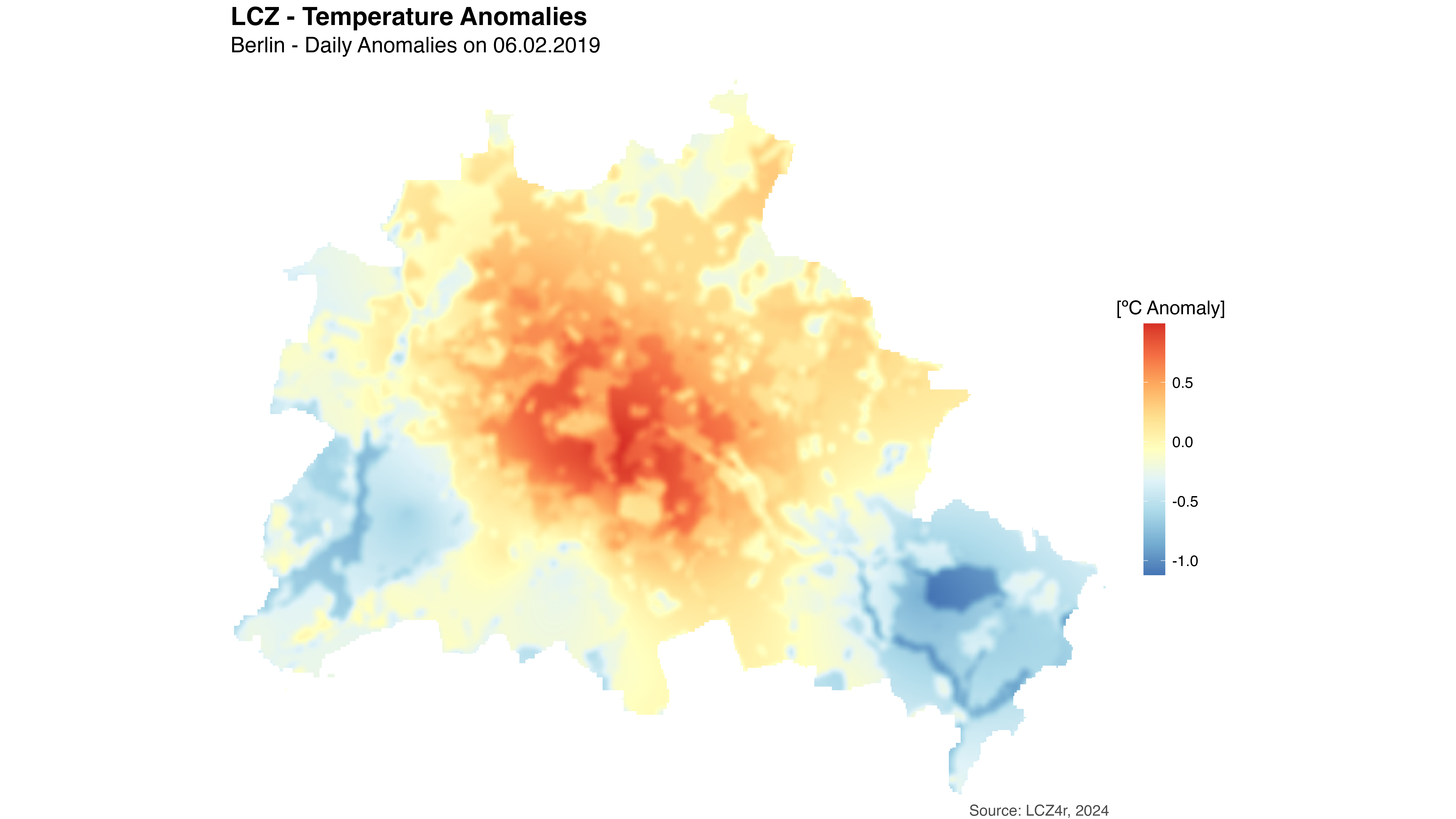
2019 年 2 月 6 日柏林的热异常地图。红色区域表示温度高于城市平均水平(热点),而蓝色区域表示温度低于平均水平(冷点)。
白天和夜间异常
使用 by = "daylight"
论证将分析分为白天和夜间时段,揭示了昼夜循环之间的热模式如何变化。
# 将异常情况分为白天和夜间两类
my_anomaly_map <- lcz_anomaly_map(lcz_map,
                                  data_frame = lcz_data,
                                  var = "airT",
                                  station_id = "station",
                                  sp.res = 100,
                                  tp.res = "hour",
                                  year = 2019, month = 2, day = 6,
                                  by = "daylight")

# 为了清晰起见,请重命名栅格图层。
names(my_anomaly_map) <- c("Daytime", "Nighttime")

# 绘制昼夜热异常图
lcz_plot_interp(my_anomaly_map,
                title = "LCZ Temperature Anomalies",
                subtitle = "Berlin - Diurnal Cycle on February 6, 2019",
                caption = "Source: LCZ4r, 2024",
                fill = "Temperature Anomaly [°C]",
                palette = "bl_yl_rd")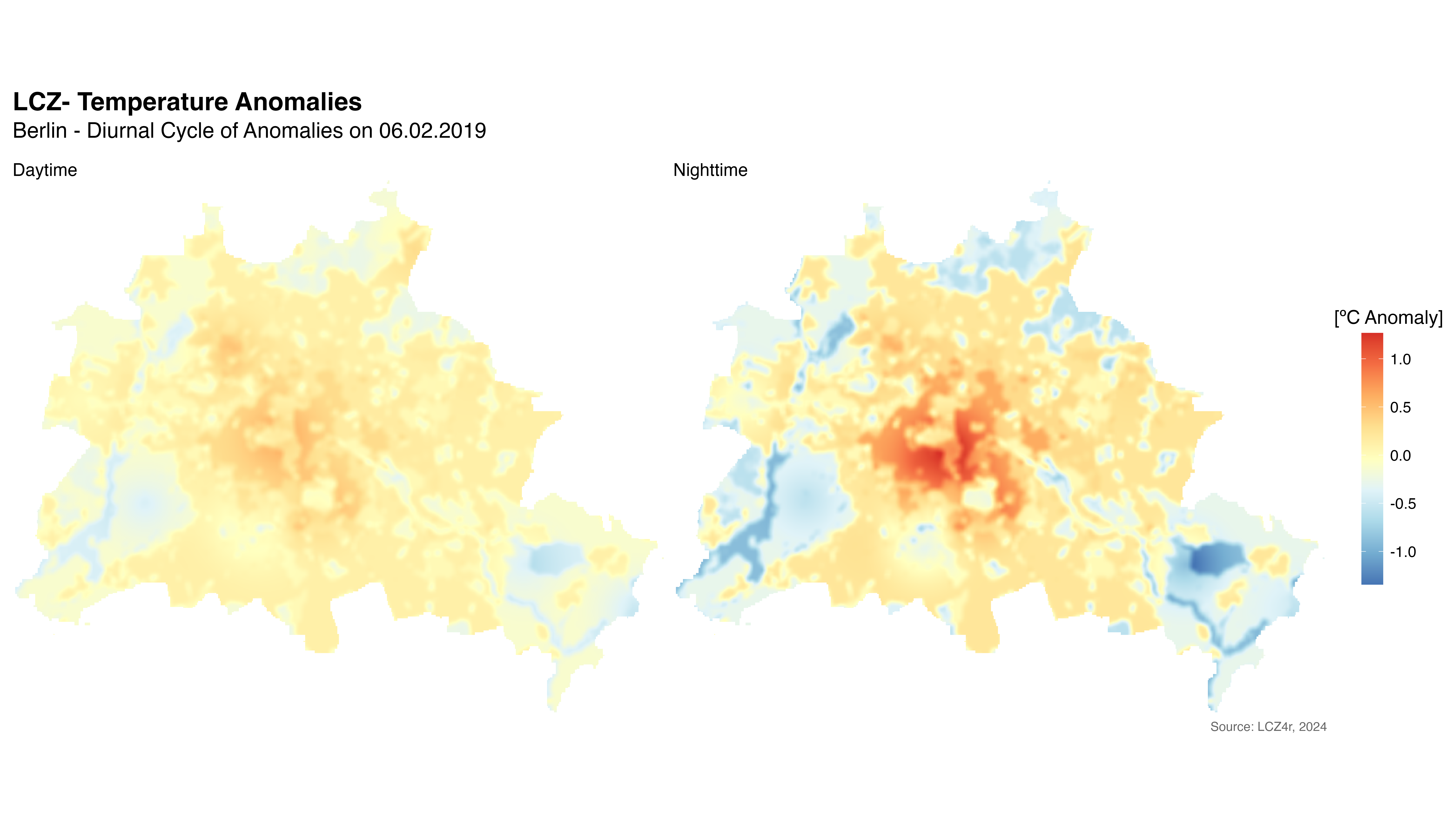
2019 年 2 月 6 日白天和夜间热异常的比较。这揭示了城市白天和夜间热模式的差异,城市热岛通常在日落后加强。
高级建模选项
季节性温度模式
您可以生成不同季节的温度图以了解季节变化:
# 生成 2019 年季节性温度图
seasonal_maps <- lcz_interp_map(lcz_map,
                                data_frame = lcz_data,
                                var = "airT",
                                station_id = "station",
                                sp.res = 100,
                                tp.res = "day",
                                year = 2019,
                                by = "season")

# 可视化季节性模式
lcz_plot_interp(seasonal_maps,
                title = "Seasonal LCZ Air Temperature Patterns",
                subtitle = "Berlin - 2019",
                caption = "Source: LCZ4r, 2024",
                fill = "Temperature [°C]")
自定义空间分辨率
调整空间分辨率以满足您的分析需求:
# 高分辨率(50米)用于详细分析
high_res_map <- lcz_interp_map(lcz_map,
                               data_frame = lcz_data,
                               var = "airT",
                               station_id = "station",
                               sp.res = 50,  # Higher resolution
                               tp.res = "hour",
                               year = 2019, month = 7, day = 15, hour = 14)

# 较低分辨率(500米)用于区域概览
low_res_map <- lcz_interp_map(lcz_map,
                              data_frame = lcz_data,
                              var = "airT",
                              station_id = "station",
                              sp.res = 500,  # Lower resolution
                              tp.res = "hour",
year = 2019, month = 7, day = 15, hour = 14)提示:较高的空间分辨率(较低的 sp.res 值)可生成更详细的地图,但需要更多的计算资源。从默认的 100 m 分辨率开始,然后根据您的具体需求和可用的计算能力进行调整。
多个时间步长
生成多个日期的地图来分析时间变化:
# 生成一年中特定日期的地图
selected_dates <- lcz_interp_map(lcz_map,
                                 data_frame = lcz_data,
                                 var = "airT",
                                 station_id = "station",
                                 sp.res = 100,
                                 tp.res = "day",
                                 year = 2019,
                                 month = c(1, 4, 7, 10),
                                 day = 15)

# 可视化季节变化
lcz_plot_interp(selected_dates,
                title = "Seasonal Temperature Progression",
                subtitle = "Berlin - 2019 (15th of Jan, Apr, Jul, Oct)",
                caption = "Source: LCZ4r, 2024",
                fill = "Temperature [°C]")
使用光栅输出
插值函数返回可以进一步分析的栅格对象:
访问栅格值
# 提取栅格数据进行统计分析
library(raster)

# 获取特定位置的温度值
temperature_at_point <- extract(my_interp_map,
                                cbind(longitude, latitude))

# 计算研究区域的汇总统计数据
mean_temperature <- cellStats(my_interp_map, stat = "mean")
max_temperature <- cellStats(my_interp_map, stat = "max")
min_temperature <- cellStats(my_interp_map, stat = "min")

# 按LCZ分类计算温度
lcz_values <- extract(my_interp_map, lcz_map)参数汇总
以下是插值函数中使用的主要参数的快速参考:
| 参数 | 描述 | 选项 |
|---|---|---|
sp.res |
空间分辨率(米) | 数字(例如 100、250、500) |
tp.res |
时间聚合频率 | “时”、“日”、“月”、“年” |
by |
数据分割方式 | “小时”、“季节”、“月份”、“日光”等 |
palette |
可视化调色板 | “bl_yl_rd”、“viridis”、“岩浆”等 |
fill |
彩条标签 | 文字说明 |
title |
情节标题 | 文字 |
subtitle |
剧情副标题 | 文字 |
caption |
情节标题 | 文字 |