时间序列分析
Max Anjos
September 18, 2026
Source:vignettes/local_func_time_series.Rmd
local_func_time_series.Rmd入门
这 lcz_ts() 功能允许您分析随时间变化与当地气候区 (LCZ)
相关的气温数据。在本教程中,我们将使用以下命令对 2019-2020
年柏林的气温进行每小时频率分析 lcz_data 来自 LCZ4r
封装。
library(LCZ4r)

# 获取您所在城市的LCZ地图
lcz_map <- lcz_get_map_euro(city = "Berlin")

# 从LCZ4r加载样本数据
data("lcz_data")
基本时间序列分析
让我们从基本分析开始 lcz_ts() 观察每小时的温度波动。
# 获取每月 LCZ 气温时间序列
lcz_ts(lcz_map,
       data_frame = lcz_data,
       var = "airT",
       station_id = "station",
       time.freq = "month",
       ylab = "Air temperature [°C]",
       xlab = "Date",
       title = "LCZ - Time Series",
       caption = "Source: LCZ4r, 2024.")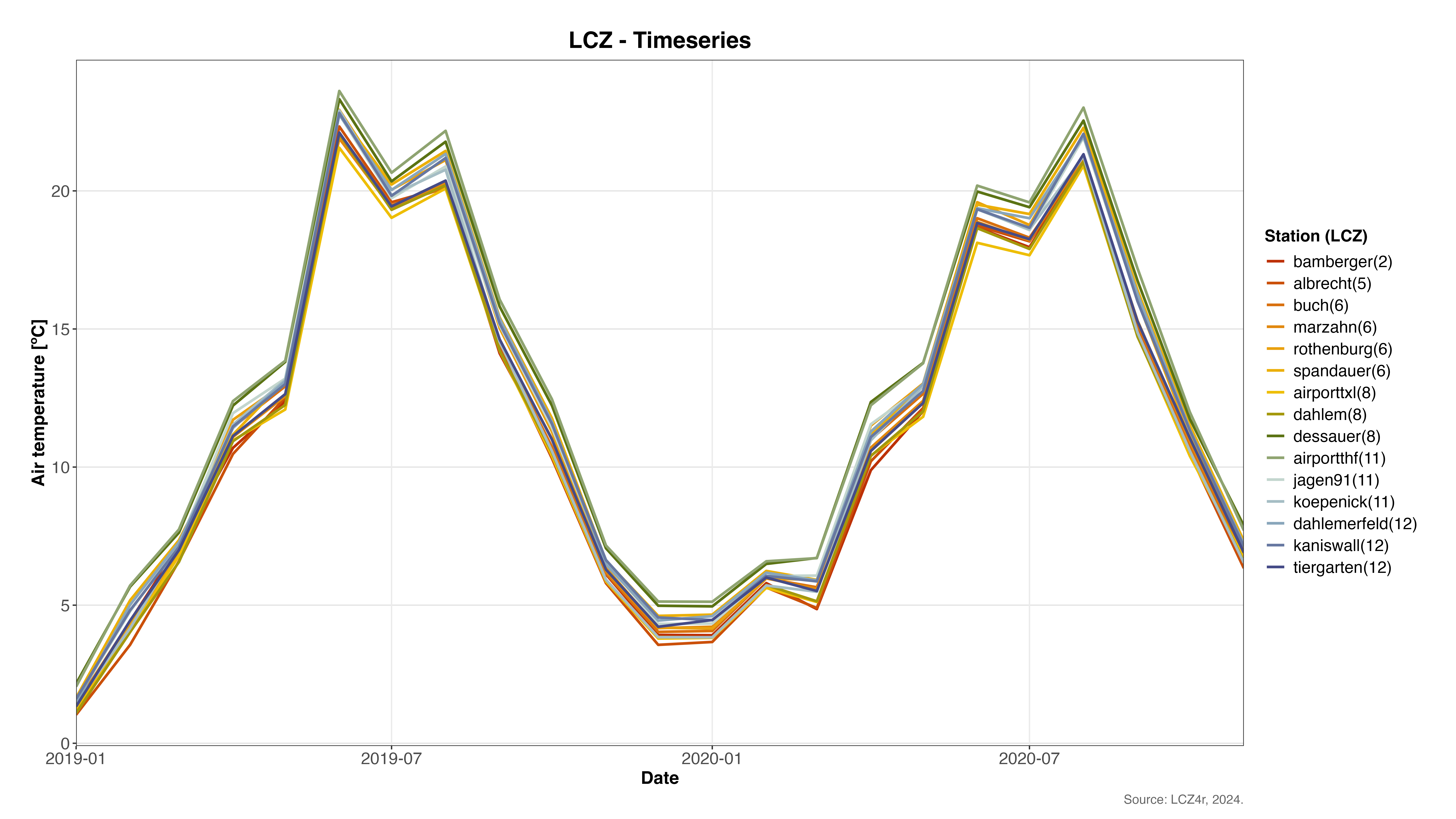
柏林每月 LCZ 气温时间序列显示不同 LCZ 类别的季节性温度变化
使用plot_type 绘制选项
这 plot_type 论证中 lcz_ts()
提供多种可视化效果:
- “basic_line”:简单的线图
- “faceted_line”:按 LCZ 或车站划分的带面的线图
- “热图”:用于可视化时间模式的热图
- “warming_stripes”:代表温度随时间变化的条纹
以下是使用每种绘图类型的示例。
1. 基本线图
# 2019年9月每日气温
lcz_ts(lcz_map,
       data_frame = lcz_data,
       var = "airT",
       station_id = "station",
       time.freq = "day",
       year = 2019, month = 9,
       plot_type = "basic_line")
显示 2019 年 9 月柏林每日气温变化的基本线图
2. 按车站划分的多面线图
# 2019年1月至3月各站点每日气温
lcz_ts(lcz_map,
       data_frame = lcz_data,
       var = "airT",
       station_id = "station",
       time.freq = "hour",
       year = 2019, month = 1:3,
       plot_type = "facet_line",
       facet = "station")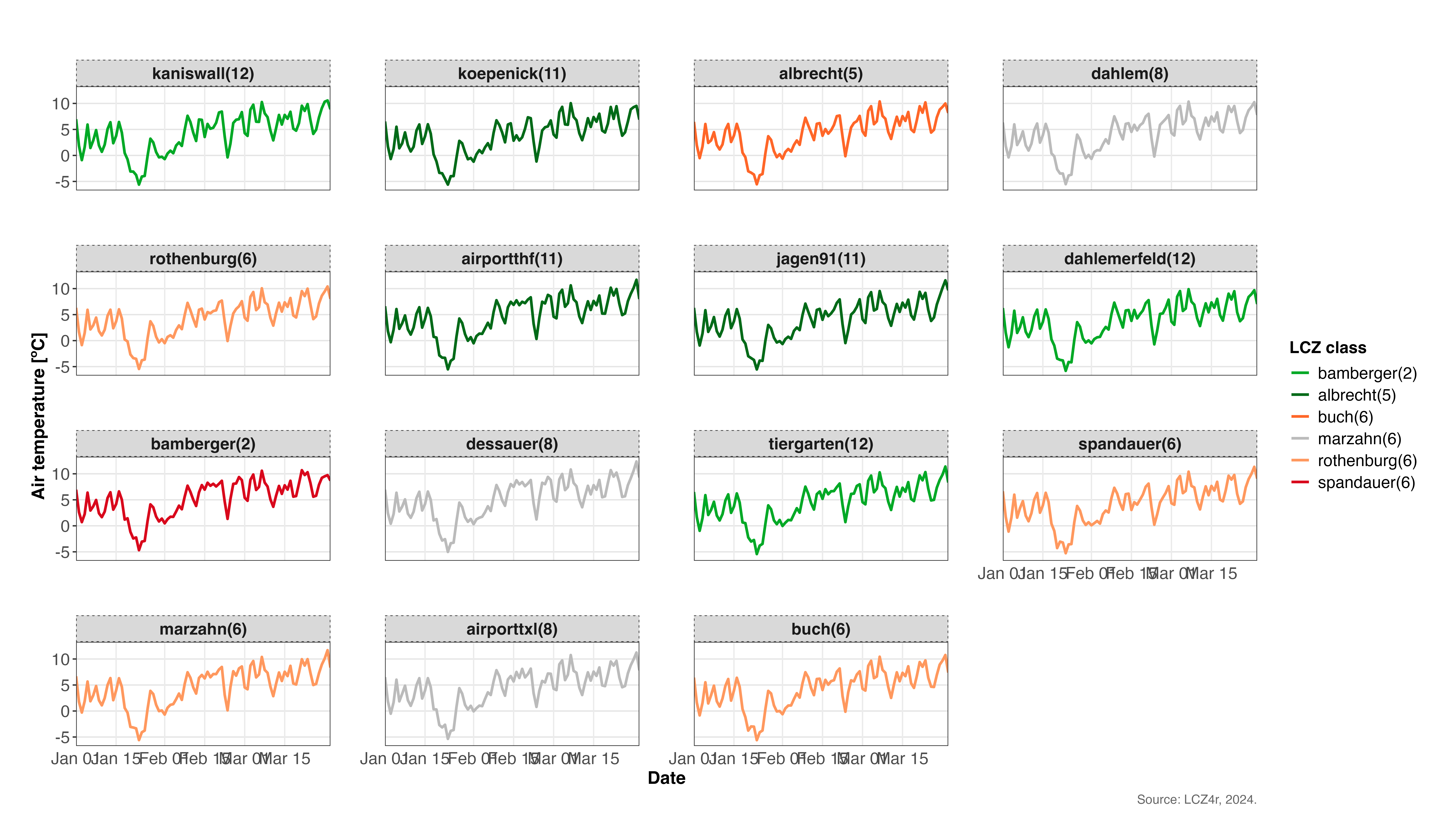
显示柏林不同气象站温度模式的多面线图(2019 年 1 月至 3 月)
3. 温度随时间变化的热图
# 2020年1月15日每小时气温,LCZ面
lcz_ts(lcz_map,
       data_frame = lcz_data,
       var = "airT",
       station_id = "station",
       time.freq = "hour",
       year = 2020, month = 1, day = 15,
       plot_type = "heatmap",
       facet = "LCZ")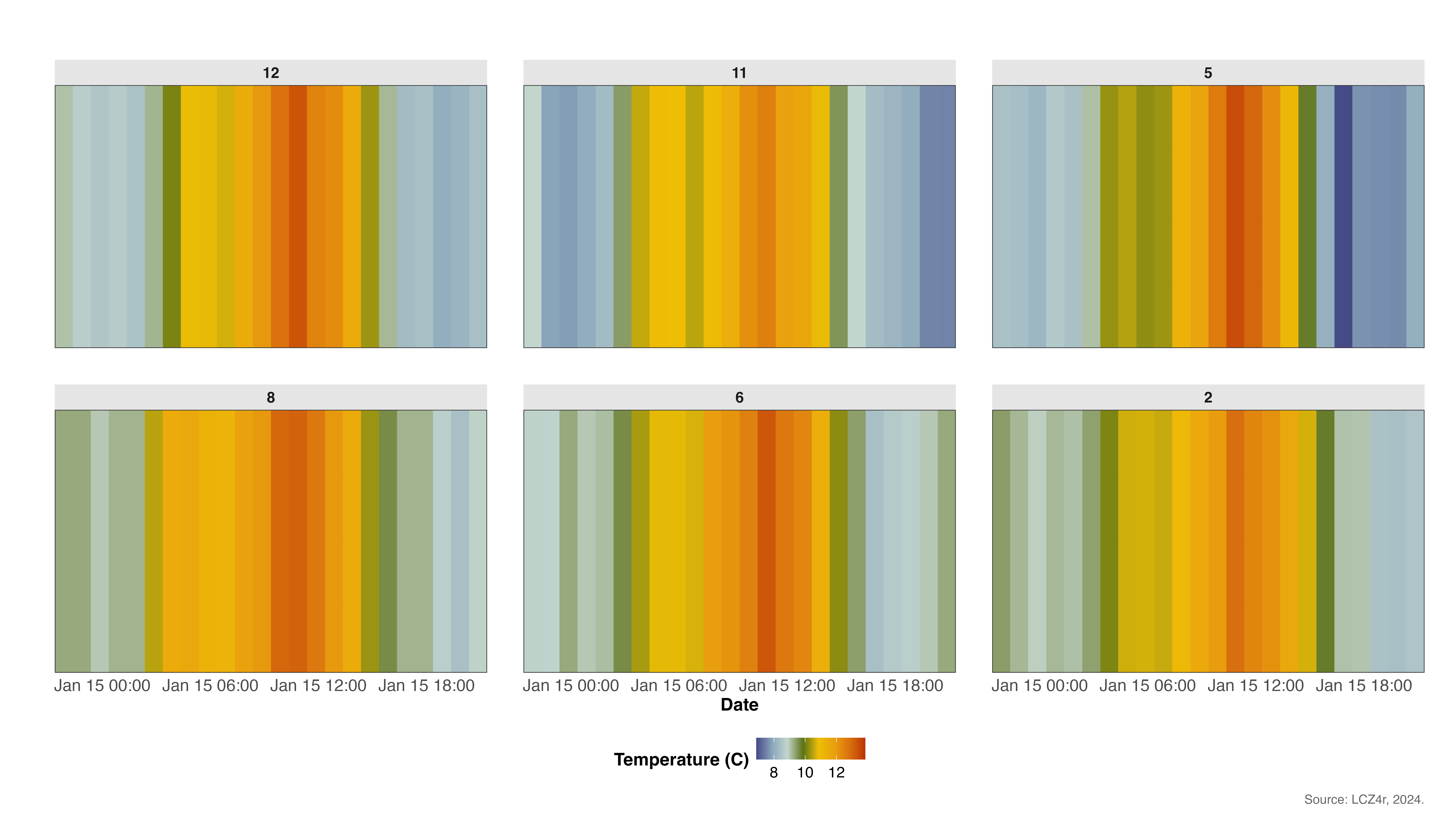
显示 2020 年 1 月 15 日不同 LCZ 类别每小时温度变化的热图
4. 保暖条纹
# 2020 年逐小时气温,以升温条纹的形式呈现
lcz_ts(lcz_map,
       data_frame = lcz_data,
       var = "airT",
       station_id = "station",
       time.freq = "hour",
       year = 2020, month = 1:12,
       plot_type = "warming_stripes",
       facet = "LCZ")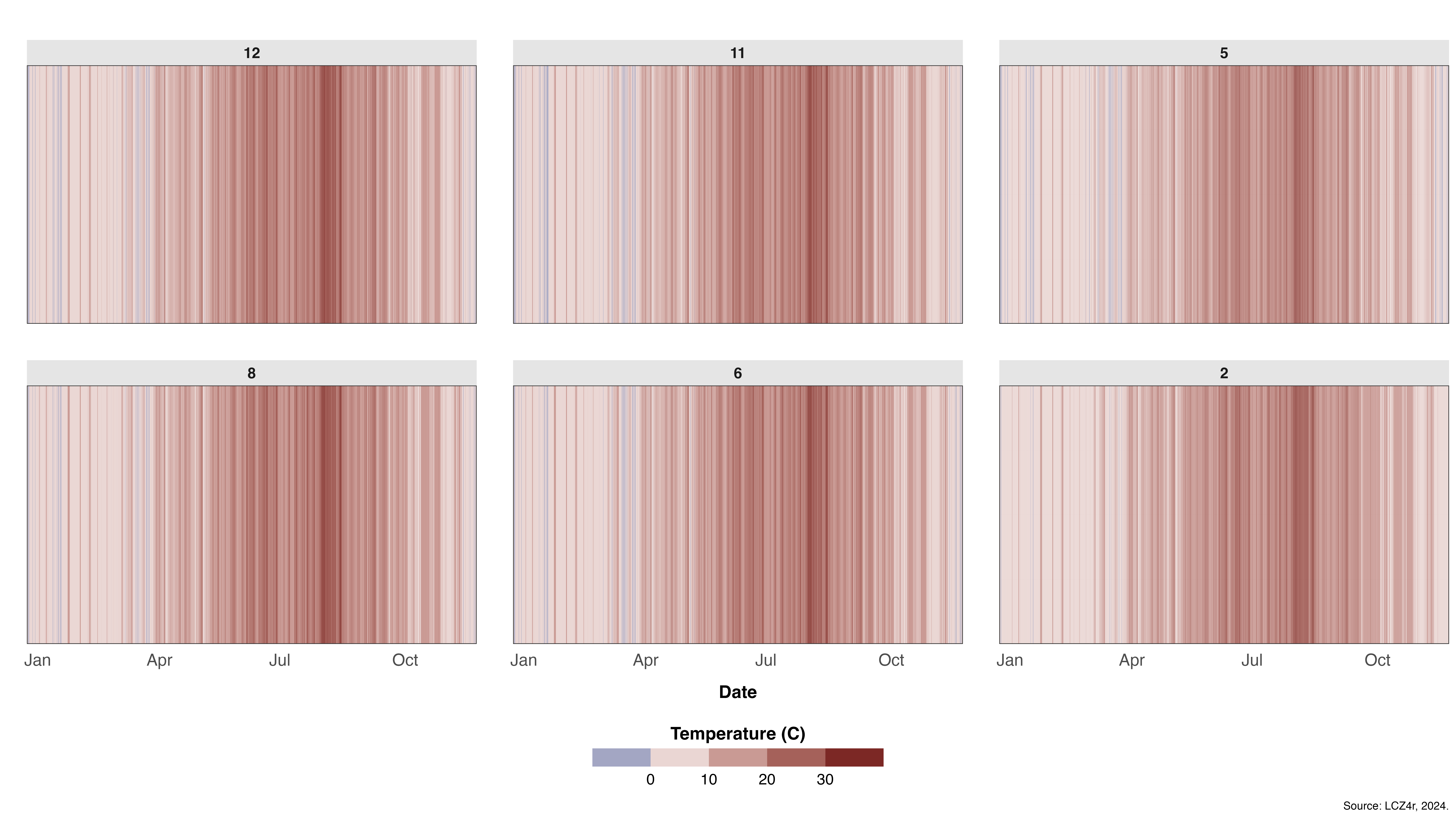
变暖条纹可视化显示 2020 年不同 LCZ 类别的温度趋势
使用“by”参数拆分数据
您可以按时间或空间类别(例如“年”、“月”、“季节”、“工作日”、“周末”、“年份季节”等)分割数据。
# 2020年各季节每日气温
lcz_ts(lcz_map,
       data_frame = lcz_data,
       var = "airT",
       station_id = "station",
       time.freq = "day",
       year = 2020,
       plot_type = "basic_line",
       by = "season")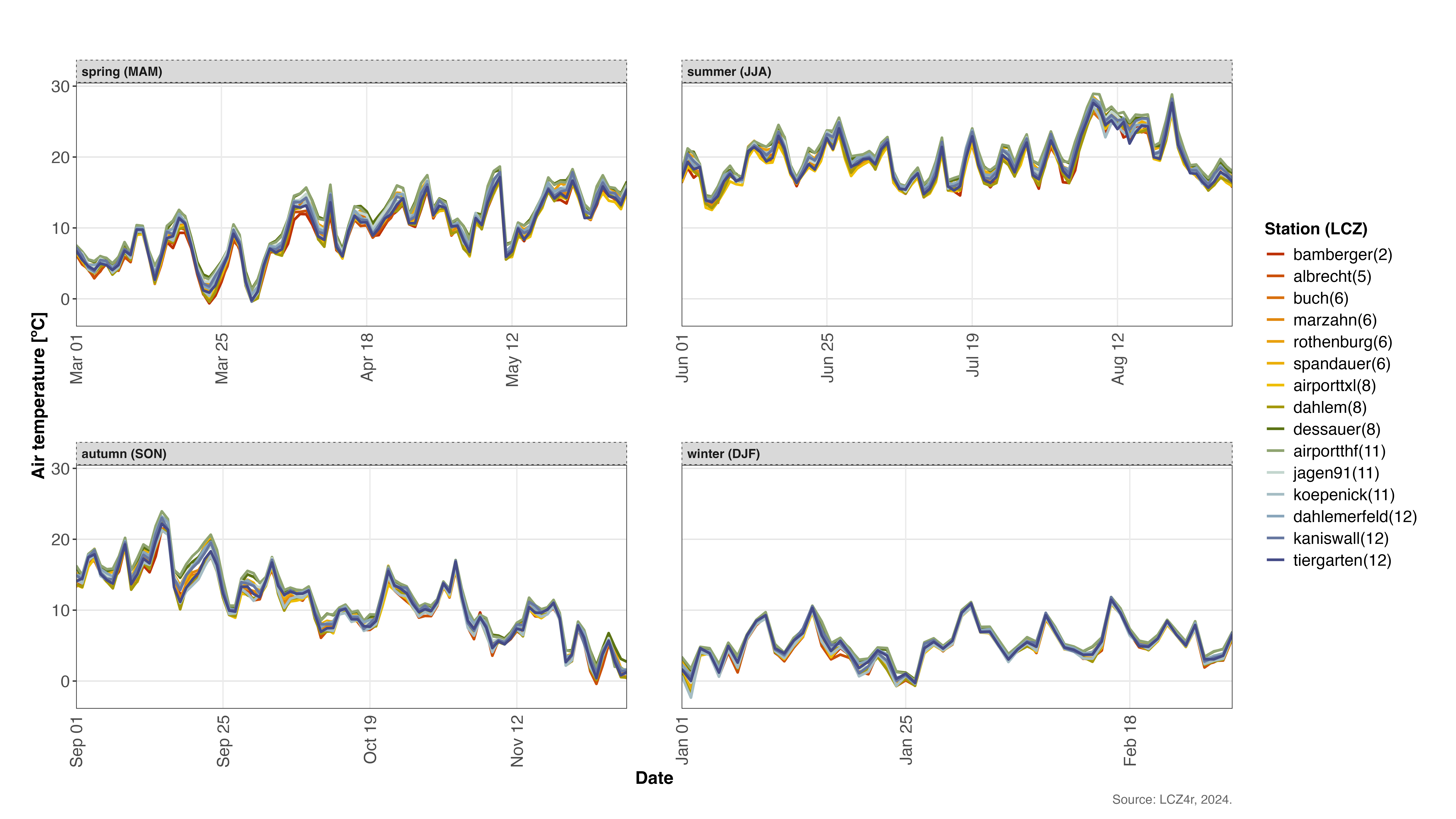
2020年柏林不同季节气温变化
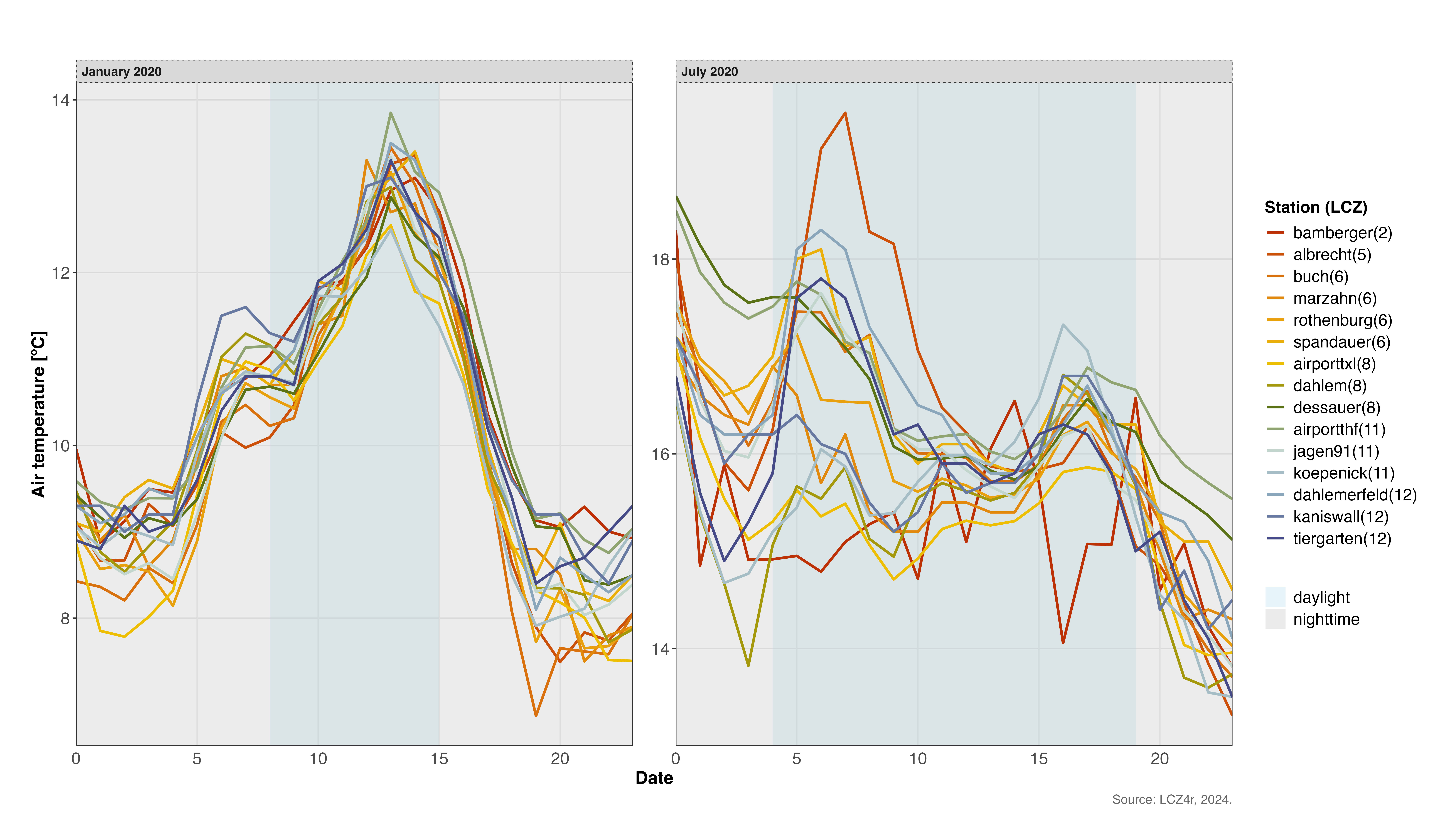
用“by”参数划分夜间和白天
您还可以按夜间和白天时段分割数据 by = "daylight".
# 2020年1月15日气温日变化
lcz_ts(lcz_map,
       data_frame = lcz_data,
       var = "airT",
       station_id = "station",
       time.freq = "hour",
       year = 2020, month = 1, day = 15,
       plot_type = "heatmap",
       by = "daylight")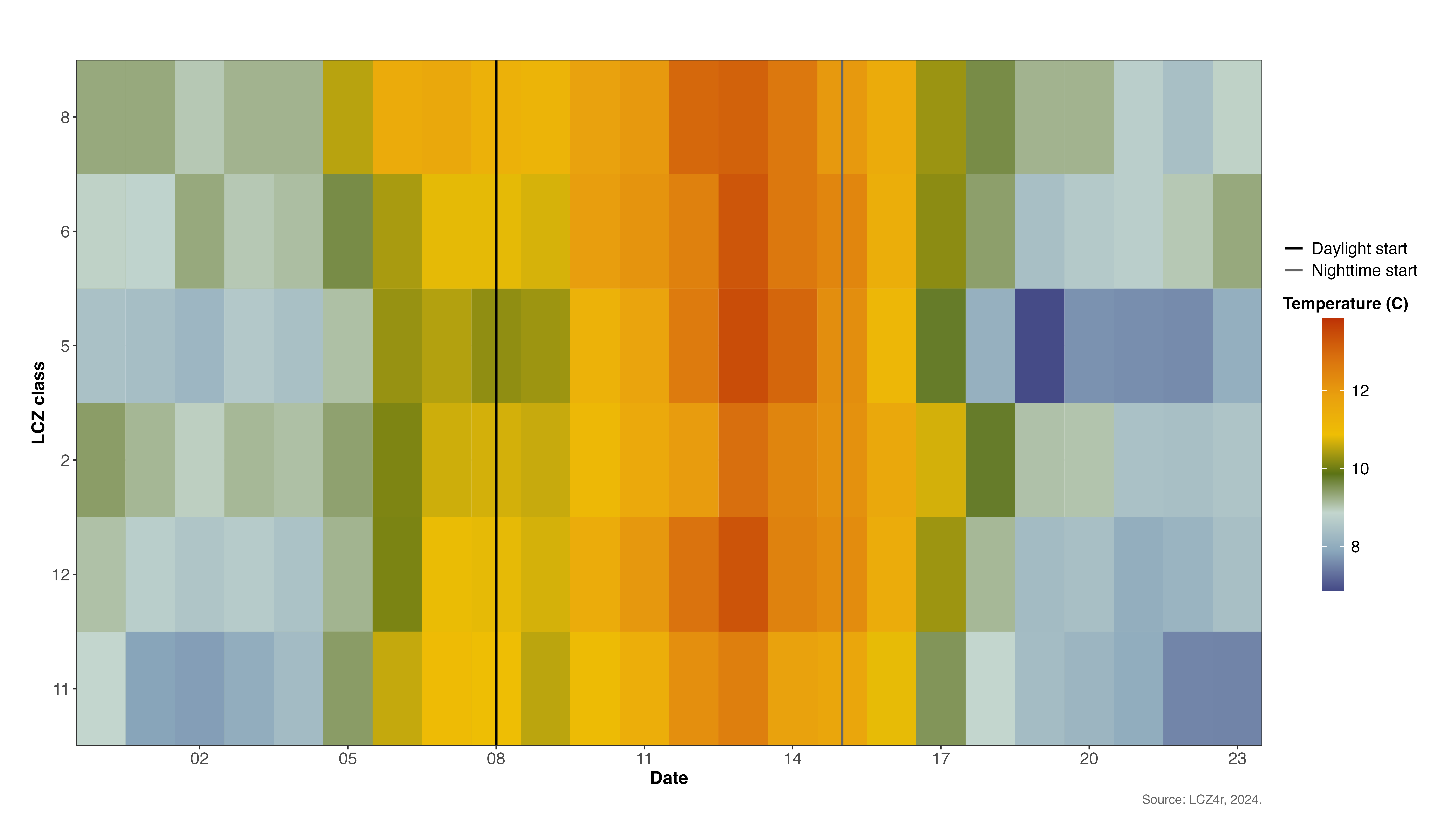
2020年1月15日白天和夜间气温模式对比
平滑温度趋势
通过设置启用平滑 smooth = TRUE,它添加了广义加性模型
(GAM) 线来显示温度趋势。
# 2019-2020年各站点每日气温变化趋势
lcz_ts(lcz_map,
       data_frame = lcz_data,
       var = "airT",
       station_id = "station",
       time.freq = "hour",
       year = 2019:2020,
       plot_type = "basic_line",
       smooth = TRUE)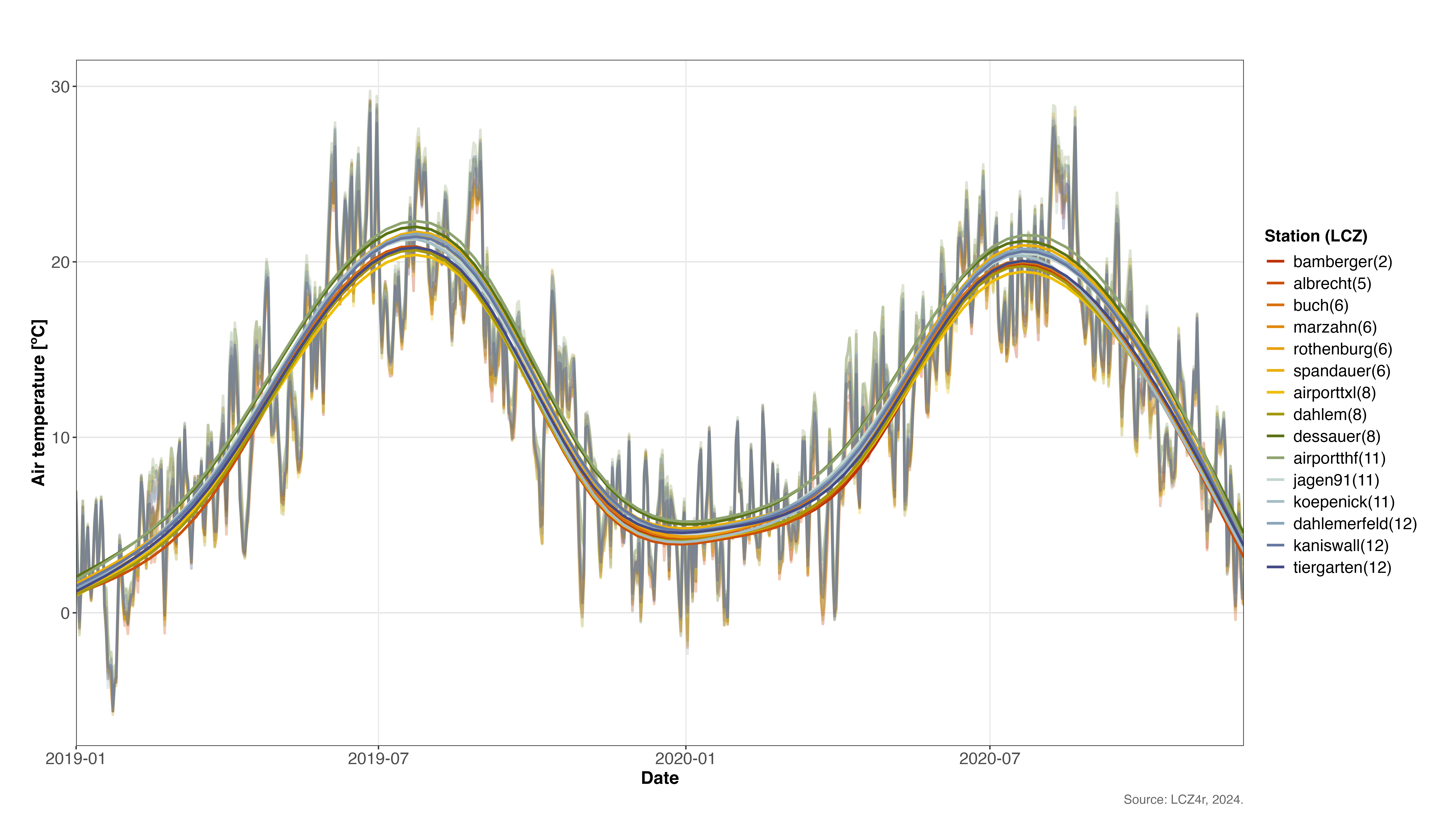
2019-2020 年各站 GAM 平滑的温度趋势
保存地块
要保存绘图和数据框,请设置 isave = TRUE 并指定文件类型
save_extension
(例如,“png”、“jpeg”、“svg”、“pdf”)。一个文件夹
LCZ4r_output 在您的 PC 上创建。
# 将日光图和数据框保存到电脑
lcz_ts(lcz_map,
       data_frame = lcz_data,
       var = "airT",
       station_id = "station",
       time.freq = "hour",
       year = 2020, month = 1, day = 15,
       plot_type = "basic_line",
       by = "daylight",
isave = TRUE)提示:保存的文件将自动组织在
LCZ4r_output 带有时间戳的文件名的文件夹,以便于参考。
参数汇总
以下是主要参数的快速参考 lcz_ts():
| 参数 | 描述 | 选项 |
|---|---|---|
time.freq |
时间聚合频率 | “时”、“日”、“月”、“年” |
plot_type |
可视化类型 | “basic_line”、“facet_line”、“热图”、“warming_stripes” |
by |
数据分割方式 | “季节”、“月份”、“工作日”、“日光”、“年份季节” |
smooth |
添加GAM趋势线 | 对/错 |
isave |
将输出保存到 PC | 对/错 |
iplot |
显示图 | 对/错 |