Introduction to LCZ4r-QGIS plugin
Max Anjos
September 18, 2026
Source:vignettes/Introd_QGIS_LCZ4r.Rmd
Introd_QGIS_LCZ4r.RmdIntroduction to LCZ4r-QGIS Plugin
🌍 A Multilingual Integration
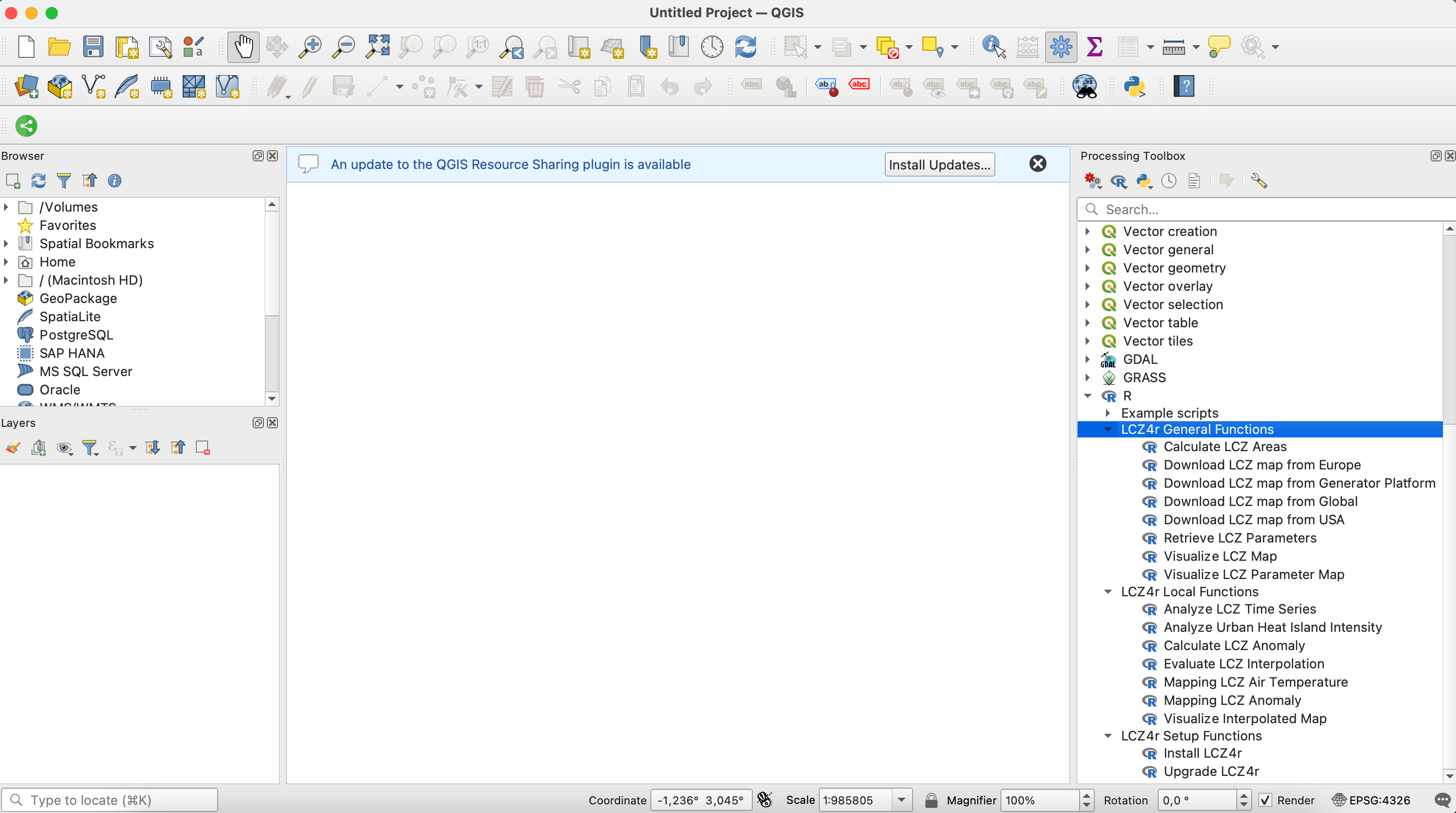
The LCZ4r-QGIS plugin repository integrates the LCZ4r package with QGIS in multiple languages. It facilitates the integration of the General Functions and Local Functions from the LCZ4r package into QGIS, allowing users to analyze Local Climate Zones (LCZ) and urban heat islands directly within the QGIS environment.

What is LCZ4r-QGIS?
LCZ4r-QGIS is a bridge between the powerful statistical capabilities of R (through the LCZ4r package) and the intuitive GIS interface of QGIS. It brings advanced urban climate analysis tools to your fingertips without requiring deep programming knowledge.
✨ Key Features
Seamless Integration
Smooth interaction between QGIS and the LCZ4r package, enabling users to leverage R’s statistical and graphical capabilities within the QGIS interface.
User-Friendly Interface
Accessible for users familiar with QGIS, making complex analyses simpler to execute without requiring extensive programming knowledge.
Urban Climate Analysis
Tools for analyzing and visualizing Local Climate Zones (LCZ) and Urban Heat Islands (UHI) with professional-grade outputs.
Multilingual Support
Available in 12+ languages, making urban climate analysis accessible to researchers and practitioners worldwide.
🗃️ Installation
For detailed installation instructions, please visit the LCZ4r Installation Guide.
Quick Installation Steps:
- Install R (version 4.0-4.3) and Rtools (Windows)
- Install the “Processing R Provider” plugin in QGIS
- Download the LCZ4r scripts for your preferred language
- Configure the R scripts folder in QGIS settings
- Run “Install LCZ4r” from the Setup Functions
First-time installation may take 5-10 minutes to install all dependencies.
🌐 Translation Process
The translation process evolves through three levels of quality assurance, ensuring accessibility while maintaining technical accuracy:
✅ Human Translation
The functions and documentation of LCZ4r were translated manually by experts familiar with Climatology, LCZ, and GIS.
Quality: Highest accuracy, culturally nuanced
Languages: English, Portuguese
🔄 AI-Assisted, Human-Reviewed
Translations initially performed by AI and then reviewed and refined by human experts familiar with Climatology, LCZ, and GIS.
Quality: High accuracy with expert validation
Languages: German, Chinese, Spanish, French
🤖 AI-Only Translation
All functions and corresponding documentation were fully translated using AI, without human review.
Quality: Good accuracy, rapid deployment
Languages: Japanese, Italian, Hindi, Arabic, Bengali, Russian
🚀 What You Can Do with LCZ4r-QGIS
General Functions
| Function | Description |
|---|---|
| Download LCZ Map | Get LCZ maps from global, European, or USA datasets |
| Clip LCZ Map | Extract LCZ data for specific cities or regions |
| Calculate LCZ Area | Compute area statistics for each LCZ class |
| Get LCZ Parameters | Extract urban canopy parameters (SVF, ISF, HRE, etc.) |
🤝 Contributing
We welcome contributions to the LCZ4r-QGIS plugin! Here’s how you can help:
- Translate the plugin to new languages
- Report bugs and suggest features
- Improve documentation
- Share your workflows and case studies
📧 Contact
Have questions, suggestions, or want to contribute?
🤝 We’re always looking for collaborators to help improve LCZ4r for everyone!
📬 Have feedback or suggestions?
Do you have an idea for improvement or did you spot a mistake? We’d love to hear from you! Click the button below to create a new issue (GitHub) and share your feedback or suggestions directly with us.
Open GitHub issue